Archive for the ‘Guides’ Category

How to Turn On FaceTime on iPhone 4

Friday, June 25th, 2010

Since three of the four people in my office didn’t realize that FaceTime isn’t enabled by default, we thought it would be nice to share the simple, but easily over-looked aspect of how to actually turn it on for anyone with an iPhone 4.  And yes, I am jealous, but I’m on Verizon and that’s not changing anytime soon (though I think my Android phone is heading to the trashbin fairly soon – more on that another time).  Also, I think this post will do really well for my blog’s SEO purposes, which is great because of all the ads I show.  Oh, wait…  Anyhow, here you go:

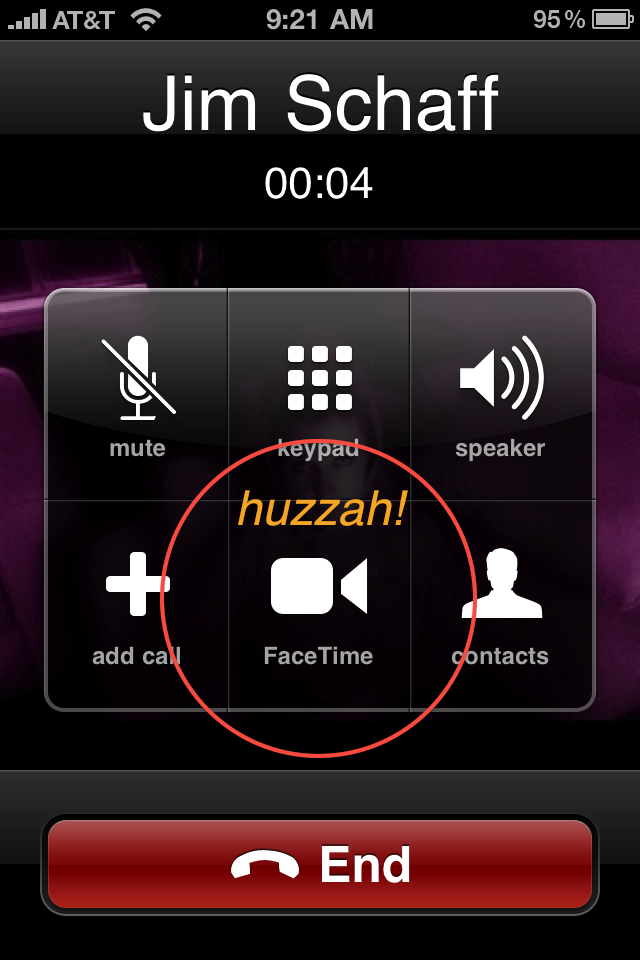
When you first get your iPhone and make a call, it’ll look like the old iPhone call screen:

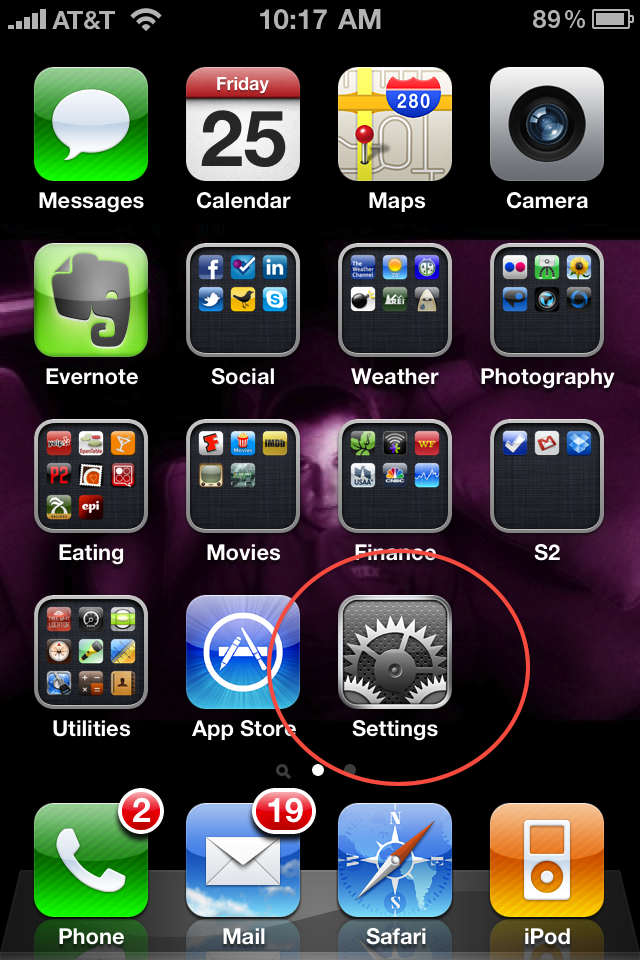
Don’t fret, you are merely 4 clicks away from Facetime!  First, go to home, then settings:

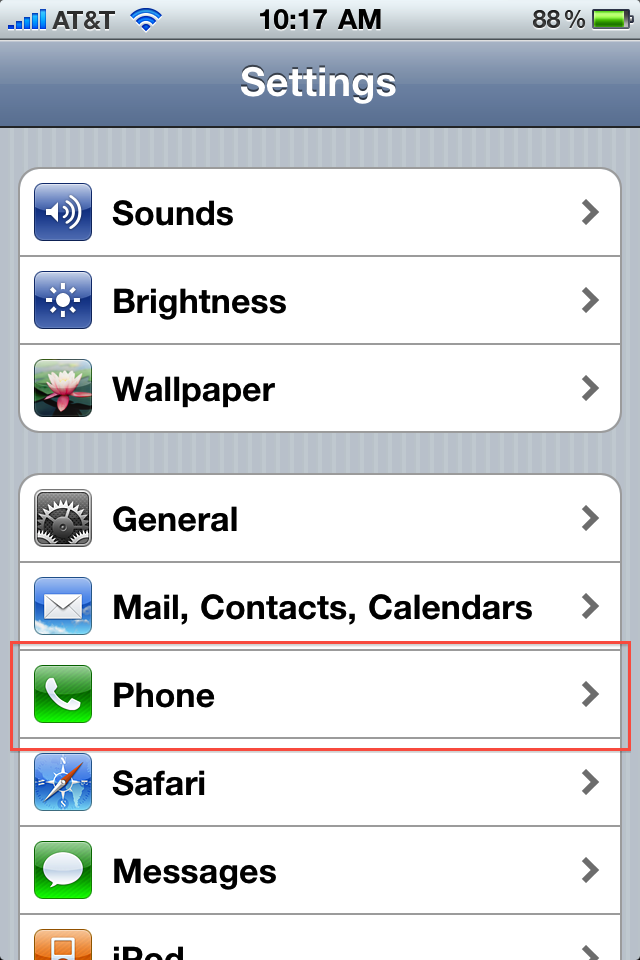
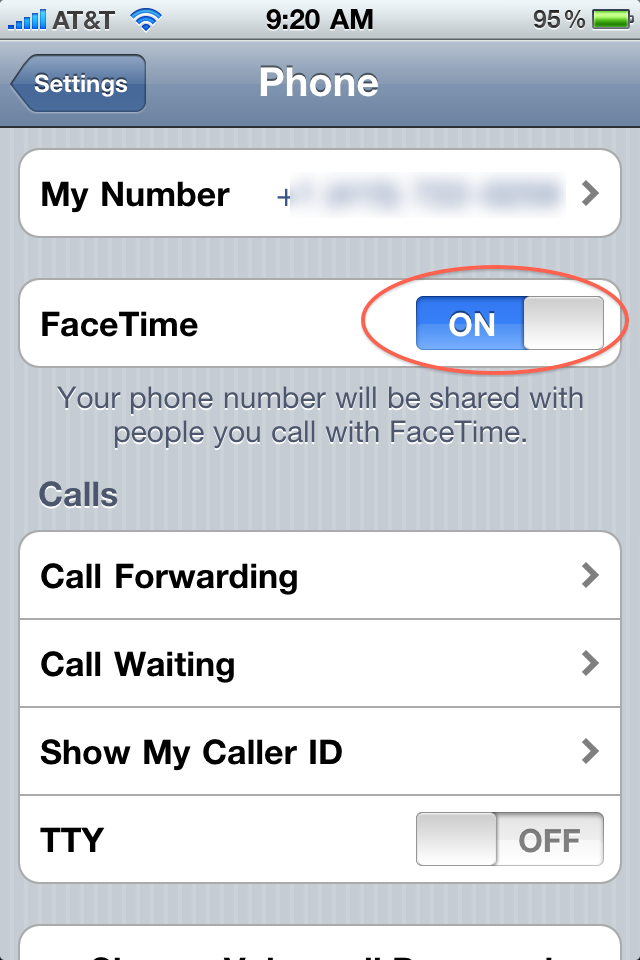
Then click on “Phone” settings.  Now you’ll see a big happy shiny button to enable FaceTime.  Do so.

Now the next time you make a call, you’ll see the FaceTime button dead-center in the middle.  And all will be well in your world!

We had a little debate about if this should’ve been enabled by default or not. I think we all agreed it seemed a bit odd to start disabled, but I’m sure there was some reason behind it, possibly due to privacy, bandwidth concerns, etc.  Once FaceTime is enabled, you’ll also notice a slight change in your call history:

I wonder if a future version of iOS will enable FaceTime voicemails or recording?

Anyhow, hope this was helpful to those who didn’t want to have to use the official Apple FaceTime tryout number!  :)

11 Things You Should Never Do Online

Wednesday, March 17th, 2010

Did you know you could lose insurance benefits from putting photos online?  Or that a Tweet can put you in jail?  Or that the FBI might be friending you on Facebook?  Or that even brand-new service Chatroulette isn’t truly anonymous? I’ve blogged recently on my concerns about privacy trends, and it’s quite the hotly debated topic these days.

I see two primary reasons why you shouldn’t do something online:

  • Personal Harm/Loss
  • Future Regret

So without further adieu, here’s 11 Things You Should Never Do Online!

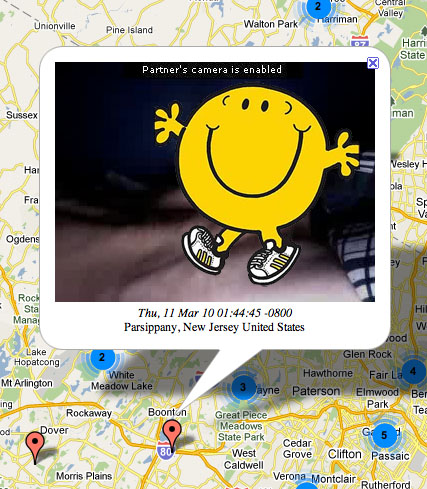
  1. Show your goods. One would think this would be obvious. One would imagine that an individual would not normally choose to show their private parts to the entire world, presuming they are not in the adult entertainment industry. It took me less than a minute on Chatroulettemap to find a picture of a naked guy, and his hometown (pictured here, safely edited by me). Here are some NSFW pictures found on Facebook. Why shouldn’t you do this? How about “decency” or “self-respect”? I wouldn’t even call it prudish to say there is a reason for the phrase “private parts” and some things are simply best left out of the public eye. Leave it to the pro’s, people.  Nobody’s going to be walking around when they are 80 years old saying to themselves “I sure regret not showing my penis to the entire world.”  Unless they have some kind of exceptional penis, that is.
  2. Meet a random stranger in a non-public location. As a child I was taught not to get into cars with strangers.  Of course I was also using public transportation as of age 8, but I don’t think that’s too contradictory.  We’ve heard numerous stories of people meeting strangers via sites like Craigslist, then bad things happen.  I have no problem with online dating services, but use some common sense people.  How about having 2-3 dates in public before you decide to even reveal your home address (assuming you haven’t done so already online – see more below)?  Why shouldn’t you do this? Pretty much goes without saying – and while there will always be creeps and they will always find methods of doing terrible things, but how about not enabling them to occur so easily?
  3. Publicize travel plans. Be it foursquare, brightkite, gowalla, plancast, tripit, dopplr or anything else, the concept that an individual would specifically tell anybody in public that they aren’t at home is something I personally find mind-boggling.  Whether it’s a simple burglary (or much much worse), there’s no greater bait I can think of for a wrong-doer. And to think that all criminals are simply too stupid to figure this out is somewhere between ignorant and elitist. Heck, teenagers in the UK find empty swimming pools with Google Earth, and thieves last year used it to find and steal koi fish from backyards.  Why shouldn’t you do this? It doesn’t take extreme paranoia or a DVD collection of Law and Order to come to the simple conclusion that these activities are asking for trouble.  Combine public records with services like plancast and twitter, and you have the equivalent of a “how-to rob me” service that you are proactively choosing to use - it’s gonna happen.
  4. Share identity-revealing data. Over 9 million Americans have identity theft issues every year. Why on Earth would you make it easier for them?  Further, one of the easiest methods of gaining access to an identity is through simple human error and naivete.  If you put personal information, like say your credit card activities, proactively into the public eye, you are asking for problems.  And unlike physical thieves (per the above point), phishers currently use technology to steal information.  You want to put your phone number in public? Fine! Get a Google Voice account, set up a redirect, and use that.  But don’t put the same number you have to authenticate important personal records! Why shouldn’t you do this? Actually this should be the opposite question – why oh why would you put private data out in public? If I can’t get you to stop buffoonery, fine, but at least be on the watch for things that can impact your finances and credit score!
  5. Ignore privacy requests/needs of others. It’s perfectly legal to take pictures of people in public. It’s also perfectly legal to put those pictures in the public spectrum (so long as you aren’t profiteering from their likeness).  But that doesn’t mean you have to.  Some people prefer to keep their lives completely out of the public eye, and they have the right to do so (despite what many social media bloggers would like to say).  Just because you choose to publicize your life doesn’t mean everyone else has to as well.  Furthermore, and more specifically, parents should rethink what pictures they put online in public or semi-public locations.  Maybe your kids won’t want those pictures to be accessible one day when they are older – and I can guarantee they’ll have a tough time taking them down.  The oh-so-cute moments in the bath might be funny to reveal at a wedding or bar mitzvah (both private events, mind you), but how about during their sophomore year in high school, to the whole class? Not so much. Why shouldn’t you do this? It’s inconsiderate – and that’s enough of a reason.
  6. Reveal vices. My healthcare company is raising our rates 35% this year – despite no claims or major changes of status.  Their business, in a nutshell, is to profit as greatly as possible, which they accomplish by (1) raising rates, and (2) giving out minimal claims/benefits.  I will say the following unbiased and bluntly: it is in their interest to find evidence of you smoking, drinking, and otherwise acting recklessly because it lets them profit more. If I were you, I’d make sure there were no tweets, status updates, or anything else containing “So drunk I almost fell down the stairs” or “Onto my 2nd pack today. Boy these Marlboros are smooth” etc.  Why shouldn’t you do this? If you don’t think insurance companies, healthcare providers, or other “big brother-like” organizations will use social technologies to raise rates or otherwise increase profits, you are just fooling yourself.  Drink, smoke, be merry – and just enjoy it with the people you are actually spending the time with (they’ll probably appreciate it too).
  7. Mock those you may do business with. A famous PR exec once tweeted disparagingly about a magazine his firm had to pitch.  The editor in chief saw the tweet.  An ad agency salesman on his way to pitch a client openly mocked the city in which that client lived. The client saw the tweet.   Disparaging a potential (or existing) client is generally speaking, not the way one gets more business from said client.  The whole concept of doing things in public means anyone might just see them – including the people you are trying to get to spend money on you. Why shouldn’t you do this? How about… “livelihood”?
  8. Sound like a schmuck. Per the above point, you never know who is going to see the words you write. Your “witty banter” with an old high school friend on Facebook might not sound so clever to a potential employer.  I’ll be the first to admit that I am a cynic and an outspoken one, and I am certain this colors peoples’ opinions of me. But I also do my best to sound objective and educated about whatever topics I’m talking about.  While I’m sure I’ve tweeted things I shouldn’t have, or left comments on blogs that could be misconstrued, I generally make a concerted effort to consider my commentary and how it would be interpreted by a complete stranger (though I could still use improvement myself).Why shouldn’t you do this? Your words will come back to haunt you – how about just not saying them in the first place?

  9. Publicize your partying or let your friends put up embarrassing photos/videos of you. The most famous example I’ve found so far involves a swimmer and an arbitrarily-banned substance. Whoever took that picture is, in a word, a jerk. Not as big of a jerk as whomever made this happen, but a pretty big jerk nonetheless. But when you compare it to the amazing amount of inappropriate stuff you can easily find with simple Google searches, you really start to wonder if the entire concept of self-respect has gone out the window.Why shouldn’t you do this? A future employer? A future spouse? Your kids one day? Your grandkids? How about anyone you want to not massively unimpress one day.
  10. Be inconsistent with your real life claims. If you call in sick, stay offline! Let’s face it, lying consistently can be challenging – it’s something you really have to work hard at. So if you are going to call in sick, you probably shouldn’t update your Facebook status or tweet or do anything else that conflicts with your claim. I recall the classic “which tire?” tale from university lore, only dramatically more impactful with public timelines and social presences.  You should also know that when you take pictures and upload them to sites like Picasa or Flickr, the actual day/time is logged in that photo somewhere as well. Why shouldn’t you do this? Hopefully you don’t need me to tell you not to lie or otherwise make false claims in the office space or personal life.  But if you are going to, try to tow the line with your online presence as well.
  11. Assume you are not being recorded. We decided at the office to try playing Chatroulette last month. Every time we used it, we recorded our session (using freely available screen capture tools), just in case something funny/outrageous happened (and it did, and no, I won’t be sharing with the group).  Your web history is recorded by Google (if you are logged in).  Facebook knows everything you’ve done.  Most Web sites store your IP address along with the comment you leave.  The Internet Archive stores copies of just about everything. Your cookies have privacy flaws. When you do something on the Internet, it is there to stay. Don’t forget it!

The funny thing (if there is one) on the above list is if you were to ask your grandparents if you should do any of those things, they’d give you one of those “what’s wrong with you boy?” looks.  But instead here you are reading my blog because it’s actually a topic.  Them kids today…

How-To: Survive CES 2010

Tuesday, January 5th, 2010

I don’t think I’ve ever cut this quite so close to the wire before.  But, with 24 hours to go, here’s the updated version of my ever-evolving “how to survive CES” post. Per last year’s CES tips post, I’ll be including anything that was relevant then, again.

  1. Wear comfortable shoes. Still the #1 most useful tip in my opinion. Even if you are the guy wearing the $6500 suit (come on!), put on your Adidas or Reeboks or whatever to go with it. Few will notice, and if anyone questions, saying “yeah, I decided it’s smarter to be comfortable than look pretty at CES” probably trumps any kind of rebuttal. It’s a BIG show and you’ll end up walking a few miles every day. Freebie bonus tip: while walking the show floor, try to walk on the booths as they tend to have better padding than the walkways between booths.
  2. Bring Purel and some chapstick. Wash before eating, because CES is also International Germfest. Just imagine all the happy little viruses (virii?) meeting so many new friends.  Also, Vegas is in the middle of a desert, so having chapstick (and some moisturizer) helps.
  3. Skip the swag. Do you really want a Panasonic pen, or a Sony plastic bag, or a brochure from TiVo? Really? My wife has actually forbidden me from bringing home anything, period. Also, for those of you into conservation (which should be, you know, everyone), no better way to send a message than to leave LG with an extra truckfull of mints.
  4. Don’t harass booth workers. They all have jobs to do (booth babes included), and just because they are there doesn’t mean they are the right person for you to give your 30 minute lecture as to why you are unhappy with your DVD player. It’s also not fair to beat up on some marketing guy who doesn’t have a uber-techie-detail question (although if they don’t help find you the right person, well, then they’ve asked for it). Also, if you see 12 people from CNN trying to set up a video shoot, you should probably realize you’ve become a lower priority, try to grab a business card and head out rather than wait for that awkward moment…
  5. Don’t hide your badge. First, it’s just a nuisance. Second, people like me train all our booth staffers to ask people like you who you are. Third, good booth staffers will treat you the same as anyone else, although they might just filter you to the right person. If you are an important member of the press or a senior guy at a huge company, well odds are you shouldn’t be talking to the 23 year old QA person who was roped into coming to CES to help with some booth shifts. Flip side comment here: if you are working the booth and someone comes up that is a competitor, don’t be rude or glib. Treat them the same as any random booth visitor. It’s just stupid to tell them they can’t see something or take pictures, when any random schmo can do exactly that.
  6. Hydrate yourself and your hotel room: If you carry only one thing (and you should – more later), it should be a bottle of water.  Also, since your hotel room will be quite dry, leave the bathtub 1/4 full of water overnight, you’ll feel better in the morning.
  7. Plan ahead. If you have not registered for the show, you aren’t getting in (this happened to a commentor here back in 2007). If you forget your badge, you are paying a fee to get it back. Pick up your badge at one of the non-primary locations (hint: most hotels!).
  8. Don’t Travel too much. Traveling between any two destinations could easily take an hour, even as early as 8am. If you try to leave the show, go to a hotel, then come back, your day is done.
  9. Need Connections? Figure it out ahead of time. Every year it gets better, but every year it’s still bad. Internet connectivity is unreliable anywhere in the convention center. Even the press room’s Internet service went down last year. If you MUST be online for a call/meeting/briefing/WoW session, have a place in mind to do it. Get a MiFi!
  10. Use SMS to coordinate. Texting is the easiest and most reliable means of communicating across the extremely loud and busy show.
  11. Bring business cards. I would say roughly 97% of the people that I’ve met at CES over the years who don’t have cards regret not having them. Maybe it seems cool now not to carry them. Maybe you think they are so 1990s. The truth is, there’s almost no reason not to carry cards, and even looking at it from a potential loss vs potential gain perspective says: carry the darn things! And Moo cards don’t count, people.  Updated for 20092010:  Still true.
  12. Pack lightly. My recommendation is to walk the floor with either nothing or a near-empty backpack. Forget shoulder straps, you’ll be aching by the end of the day. Bring nothing you do not need during the day. Also, try to dump your bag prior to dinner, so you can spend the night on the town without having to remember anything later. What happens in Vegas…
  13. Check the live coverage. Engadget puts up a post every 3.8 seconds during CES (this is not a fact, I am just guessing). Make sure you tap into theirs (or Gizmodos or your own favorite gadget blog) during the course of the show. They might find something you hadn’t heard of before, and you might miss it otherwise.
  14. Get a chair massage. They’re all over the place, and worth it.

Yup, we’ve lost a tip this year.  But CES lost the Sands exhibit hall, so that probably makes up for it.  See ya in Vegas!

Essential Comparison Chart for Canon Point-and-Shoot Cameras

Friday, May 22nd, 2009

I’m a long-time fan of Canon’s point-and-shoot digital cameras.  I’m not a long-time fan of their numbering schema.  There are (at present) four “lines”, the 7xx, 8xx, 9xx, and 1xxx.  There is no single commonality across any camera within any line.  The “current” models for each are the 780 (newer than the 790!), 890, 960, 970, and 1200.  As far as I can tell, there is no predictability nor rhyme/reason to any model, nor any way to figure out which unit is better than another, without exhaustive research.

So, if you are like me, and want to look into purchasing a new Canon camera, you will rapidly find yourself frustrated beyond belief.  My friends, here is your cheat sheet.  Please note pricing for outdated models is based on what I could find out there, and I highly recommend *not* buying anything more than 2 years old (marked in gray – the orange columns are the “current” models)!

Here’s a direct link to the sheet for those who want to sort or search through it. I hope this is useful for anyone trying to buy a camera. If you have any other suggestions, please add your thoughts in the comments!

15 Tips to Surviving CES 2009

Monday, January 5th, 2009

JT at the LVCCI guess it’s time to call it a recurring theme, but with only 3 days left to go, it’s time for my annual “how to survive CES” post.  As per my disclaimer last year, I am copy-and-pasting anything that is still relevant (and with so little time I don’t think I have a lot of the funny in me right now).

  1. Wear comfortable shoes. It was #1 last year and is again. Even if you are the guy wearing the $6500 suit (come on!), put on your Adidas or Reeboks or whatever to go with it. Few will notice, and if anyone questions, saying “yeah, I decided it’s smarter to be comfortable than look pretty at CES” probably trumps any kind of rebuttal. It’s a BIG show and you’ll end up walking a few miles every day. Freebie bonus tip: while walking the show floor, try to walk on the booths as they tend to have better padding than the walkways between booths.
  2. Leave your remote control where it belongs – at home. There is absolutely zero upside to pranking booths. Don’t do it.
  3. Bring Purel and some chapstick. Wash before eating, because CES 2009 is also International Germfest 2009. Also, Vegas is in the middle of a desert, so having chapstick (and some moisturizer) will help.
  4. Go counter the traffic flow. I’m not the only one with this theory – the Sands Expo is opening at 8am on Thursday, while the Convention Center only opens at 10am.  Skip the huge taxi lines and head over to the Sands on Thursday, then save the LVCC for the rest of the show.The worst thing that can happen is you won’t get your hands on some crappy t-shirt you’ll never wear. Which brings me to
  5. Skip the swag. Do you really want a Panasonic pen, or a Sony plastic bag, or a brochure from TiVo? Really? My wife has actually forbidden me from bringing home anything, period. Also, for those of you into conservation (which should be, you know, everyone), no better way to send a message than to leave LG with an extra truckfull of mints.
  6. Don’t harass booth workers. They all have jobs to do (booth babes included), and just because they are there doesn’t mean they are the right person for you to give your 30 minute lecture as to why you are unhappy with your DVD player. It’s also not fair to beat up on some marketing guy who doesn’t have a uber-techie-detail question (although if they don’t help find you the right person, well, then they’ve asked for it). Also, if you see 12 people from CNN trying to set up a video shoot, you should probably realize you’ve become a lower priority, try to grab a business card and head out rather than wait for that awkward moment…
  7. Don’t hide your badge. First, it’s just a nuisance. Second, people like me train all our booth staffers to ask people like you who you are. Third, good booth staffers will treat you the same as anyone else, although they might just filter you to the right person. If you are an important member of the press or a senior guy at a huge company, well odds are you shouldn’t be talking to the 23 year old QA person who was roped into coming to CES to help with some booth shifts. Flip side comment here: if you are working the booth and someone comes up that is a competitor, don’t be rude or glib. Treat them the same as any random booth visitor. It’s just stupid to tell them they can’t see something or take pictures, when any random schmo can do exactly that.
  8. Hydrate yourself and your hotel room: If you carry only one thing (and you should – more later), it should be a bottle of water.  Also, since your hotel room will be quite dry, leave the bathtub 1/4 full of water overnight, you’ll feel better in the morning.
  9. Plan ahead. If you have not registered for the show, you aren’t getting in (this happened to a commentor here back in 2007). If you forget your badge, you are paying a fee to get it back. Pick up your badge at one of the non-primary locations (Sands, several hotels, Hilton, etc). Traveling between any two destinations could easily take an hour, even as early as 8am. Despite “CES is sounding light” stories, I’d rather be pleasantly surprised and adjust accordingly than be late for anything.
  10. Need Connections? Figure it out ahead of time. Every year it gets better, but every year it’s still bad. Internet connectivity is unreliable anywhere in the convention center. Even the press room’s Internet service went down last year. If you MUST be online for a call/meeting/briefing/WoW session, have a place in mind to do it.
  11. Use SMS to coordinate. Texting is the easiest and most reliable means of communicating across the extremely loud and busy show. Forget any “advanced” types of technology and go with something that works.
  12. Bring business cards. I would say roughly 97% of the people that I’ve met at CES over the years who don’t have cards regret not having them. Maybe it seems cool now not to carry them. Maybe you think they are so 1990s. The truth is, there’s almost no reason not to carry cards, and even looking at it from a potential loss vs potential gain perspective says: carry the darn things! And Moo cards don’t count, people.  Updated for 2009:  Still true.
  13. Pack lightly. My recommendation is to walk the floor with either nothing or a near-empty backpack. Forget shoulder straps, you’ll be aching by the end of the day. Bring nothing you do not need during the day. Also, try to dump your bag prior to dinner, so you can spend the night on the town without having to remember anything later. What happens in Vegas…
  14. Check the live coverage. Engadget puts up a post every 3.8 seconds during CES (this is not a fact, I am just guessing). Make sure you tap into theirs (or Gizmodos or your own favorite gadget blog) during the course of the show. They might find something you hadn’t heard of before, and you might miss it otherwise.
  15. Lower your expectations. If memory serves, the last time a company introduced something that was genuinely new and interesting at CES was Moxi, about 6 years ago (which was about the last time they were really interesting, unfortunately). The show is rarely the place where a company will launch newly innovative products, although it is a great place to see the ones that were announced in the past. Expect bigger/flashier screens, cameras, etc, but don’t expect something new and amazing.
    Expect some cool stuff. I’m going to go out on a limb and say this year will be a cooler one than expected at CES.  First, the way mainstream media is positioning it sounds like there’s only 4 companies left demoing and about 17 attendees at the show.  Sure, the count is down from last year, but so what?  The truth is we’ve seen more, and pardon the phrase, “riffraff” come to CES than ever before.  This is an industry show, not just some random tech meetup or Web conference, and major manufacturers and retailers are here for business.  I’ve received tons of interesting pitches so far, and I think we may be pleasantly surprised with CES 2009.

Lastly, for a moment of brash self-promotion… I’m working with five cool companies at CES 2009 (several of these have new stuff coming just in time for the show!), and would love for y’all to get some time to see them at the show.  They are: Boxee, Bug Labs, DeviceVM/Splashtop, TuneUp Media, and a new startup who’s actually launching a new gadget at the show. Yup, it’s going to be a very exciting CES!

And it’s not an HD Video Scuba Mask (yes, that’s a genuine product being pitched at the show)!

2008 Holiday Gift Guide (part 1)

Wednesday, November 26th, 2008

Grinch or no grinch, tis the season to be shopping.  In some sectors, the next 30 days represent more sales than the entire rest of the year combined.  I’ve decided to put together the first of at least one posts on what stuff I’d recommend buying this year (although the best recommendation I could possibly make is donating gift money to charity instead of buying more stuff we don’t actually need). I’ll give a major disclaimer by saying some of the products here I have a personal affiliation with (which shouldn’t be too much of a surprise, as I tend to get involved with things I like).

Most Versatile Gift:  Flip MinoHD ($229 on Amazon).
With the massive surge in personal video creation and HDTV, having an inexpensive, reliable, easy-to-use personal HD recorder just makes sense.  The Flip is a great product, works exactly as advertised, and is probably new to most people you’d buy it for (here’s a hint: if the recipient sends you a lot of HD videos already, don’t buy this for them).  You can also customize it with your own picture/design!

Most Practical Gift: External USB hard drive (numerous options).
With every passing year your likelihood of losing data to a hard drive crash increases.  If you know anyone who is not doing regular backups, shell out $99 (or less) and fix that problem.  Backup ain’t exciting, but losing data is just dumb.

For a Music-Lover: TuneUp Media for iTunes ($19.95)
Anyone who spends hours making playlists or using their iPhone at the gym, on the bus, etc, has dealt with the issue of missing or incorrect song information.  TuneUp fixes it, pure and simple.  Note: I have a professional relationship with TuneUp.

Simple Sleek, Sexy Storage is a Smart Stocking Stuffer: SuperTalent Pico USB Flash Drives (more info here)
Yeah, it’s hard to make a flash drive “sexy” but this as close as they come (plus check out that awesome alliteration!).  Check it out in 12 seconds:


SuperTalent 8GB Pico USB Drive on 12seconds.tv

For Your Programmer Friend: Bug Labs’ BUGbundle ($629)
If you have someone in your life who spends their days (and probably nights) coding, introduce them to the BUG.  Think of it as a Heathkit on Steroids (maybe Congress should investigate that one?).  Note: I have a professional relationship with Bug Labs.

For anyone living in a disaster-prone region: Medis Powerpack ($33.95you may need to buy more tips)
This is a fuel cell system good for charging your cell phone.  My wife and I have one in our emergency kit, and it seems like something virtually everyone should have available in times of need.  Here’s a quick video intro to it:


Testing the Medis 24-7 Power Pack on 12seconds.tv

For those of us exhausted by acting as tech support for our parents: Macbooks or Mac Minis (good Black Friday item)
I’ve lost almost 2 hours of my life trying to get my dad on Skype with his webcam.  My mom still has issues with simple photo sharing.  I’m pretty sure that if I were to add up my billable rate against the time I’ve spent debugging stupid technology issues that are all related to driver issues, I could’ve bought them both Macs and still showed a profit on it.

For a Gamer: Astro Gaming A40 Headset ($199)
When I was a teenager, my mom bought me Reebok Pump shoes to help me get better at basketball.  Needless to say, it was a poor investment.  With more and more video gamers turning their hobbies into potential careers, there’s actually some equipment that could help make the difference.  These headphones are crazy good, and have a lot of extra features for those who taking their gaming seriously.

For an Internet Video Maniac: Boxee on AppleTV ($250)
boxee.tv is a “social” media center (imagine Windows Media Center meets Facebook, only with less throwing sheep).  AppleTV is an underperforming media center device that hooks up to your HDTV.  boxee.tv + AppleTV is pure joy, but requires a fairly complex hack.  Not anymore, these guys’ll do it for you, and just send you a preconfigured unit.  Note: I have a professional relationship with boxee.tv (and I can get you invites).

Weirdest Gadget I can find that someone might actually like: Orbitsound T3 (not sure if they ship to US directly)
The company calls it a Mobile Stereo Speaker, I think it’s the modern boombox (note

There you have it, hopefully something in here strikes a chord and helps you find the right gift.  Again, I encourage you to make a charitable donation this year in lieu of more unneeded technology, but then again, a good holiday shopping season might just help fix our economy (in case you needed a feel-good reason).  I'd recommend thinking outside the box and avoiding buying something someone already has.  Happy shopping, and don’t forget to check out the sales this Friday!

Explaining the “Digital Transition” and Review of the RCA ANT1500 Antenna

Tuesday, August 19th, 2008

I recently had a phone interview with Lou Lenzi, Sr. Vice President, Product Management with Audiovox Accessories and he gave me the statistic that 13 million homes in the US currently use an antenna to receive television signal to their main TV. Then there is another 6 million that use and antenna to receive signal to one or more of their extra TVs. Lenzi explained that people have TVs in the spare bedroom, basement, or out in the garage, all fall into this category. That means that come February 17, 2009, there will be about 13-16 million TVs that will stop working unless some actions are taken. Some of you are saying 13 million plus 6 million is 19 million, but there are some small markets that are not required to kill their analog signal.

For those of you that want answers to every digital TV questions, here are some resources. DTVanswers.com, DTVtransition.org, and here is a video created by CEA that explains everything. For everyone else, here are the basics.

There are 2 different OTA (over the air) TV broadcasts. NTSC (National Television System Committe) and ATSC (Advanced Television Systems Committee). There is no such thing as a HD antenna, all antennas can pick up the ATSC signal, or the NTSC for that matter, it is just that the rabbit ear antennas aren’t able to pick up a strong enough digital signal. Each of the signals need a tuner to correctly interpret the signal for the television.

Everyone that has an older TV with a rabbit ears antenna, will have a couple options. The first is to pony up the money and pay for cable or satellite service on the TV. If you want to keep on receiving free television, your next option is to purchase a newer TV that comes equip with a digital (ATSC) tuner. If you want to keep your old TV, you will need to purchase a converter box that has a digital tuner. With both of these free TV options you will also need to purchase an antenna that is built for the ATSC signal, and is strong enough to receive the signal in your location.

For all of the options above there are some pros and cons. First of all, anytime an antenna is used there is the possibility of what is called “drop off”. Meaning, if the signal drops too low for the tuner to display the TV picture, the picture freezes or skips. There is no fuzzy picture that happens, which is the case when the analog (NTSC) signal is not strong enough. If you don’t have the correct antenna for your location, this problem may occur many times during a show or game, and become very annoying. The big bonus of using an antenna for HDTV is that the OTA signal is uncompressed. So if you receive a clean signal with no drop offs, you will have the potential for the absolute best picture possible, pending your TV display. If you decide to go with cable or satelitte, you will receive a 100% uninterupted signal (unless you have Comcast, but thats another issue all together), but the picture could be highly compressed. You will also be paying a monthly fee, where as with the antenna, HDTV and/or converter box, you will just be paying a one time fee. Finally, most of the indoor antennas are bulky and pretty much the eye sore of you entertainment center. Enter the RCA ANT1500.

RCA ANT1500 Photo 1 RCA ANT1500 Photo 2
Front view of the RCA ANT1500

Front view of the RCA ANT1500
with DVD case for size reference

RCA ANT1500 Photo 3 RCA ANT1500 Photo 4
Top view of the RCA ANT1500
with DVD case for size reference
Back view of the RCA ANT1500
with DVD case for size reference

This new antenna from RCA is a compact, multi-directional, HD optimized antenna. With its small, form factor, you can lay it flat on top of entertainment center, hang it flat on the wall behind your TV, or in theory, stand it upright on a shelf.

Before anyone goes out and purchases an antenna to use with their digital tuner, they should check out AntennaWeb.org. Here you can type in your address to see what channels should be broadcasted in your area, and what type of antenna you should be able to use to receive them. After you find out what antenna you should be able to use, I would purchase one at a retailer with a good return policy, in case the antenna doesn’t work quite as well as you’d like.

I live in an apartment near O’Hare airport creating 2 factors that are big downsides for digital reception. AntennaWeb.org says that I should use a powered multi-directional antenna. I tested this ANT1500 with my ATI HD Wonder card in my PC, and a 24 in widescreen monitor. I loved how small and compact the antenna was, I was able to shove it in the corner, out of the way of all of my A/V gear. I just wish I could have kept the antenna in the corner out of the way, all of the time. In fact, I had to move the antenna between 2 different locations depending on the channel that I wanted to watch. I think if the antenna wasn’t hard wired with a 6 ft. coax cable, I would have been able to attach a longer cable, and find a single location farther than 6 ft away from my tuner, that would be able to receive all of the channels successfully. With the antenna in the correct location in order to get a good signal, I would still have “drop off” about 3-4 times in a 30 min program.

RCA ANT1500 Back Stand

Besides having a hardwired coax cable, the only other design flaw is the “stand” that comes with the antenna. As you can see, there is a C shaped metal attachment that goes into 2 holes at the bottom of back of the antenna. The only thing is that, the cable comes out of the bottom as well. There is no notch or anything for the antenna to safely avoid bending at an awkward angle, making the antenna look like it is ready to fall over. I think the stand should have been thought about better, or just removed from the package altogether.

After reporting my not so awesome reception to AudioVox, they went ahead and sent me a Zenith converter box, saying it should work better than my HD Wonder card. Using the converter box was super easy, I connected the antenna to the box, and RCA cables from the box to my video and audio. The box automatically scanned for channels and was able to display programming details. Again, I had the exact same problems, needing to move the antenna between the 2 different locations, and 3-4 “drop offs” per 30 min program. My apartment might be one of the worst scenarios when it comes to digital reception.

If you live in a location where a non-powered multi-directional antenna will receive most of your channels, I highly recommend this antenna. Its small form factor is a huge plus in the world of antennas, because most of them are so darn ugly, and HUGE. Example A, B, C, D and E. Again, I would recommend trying the antenna out in your setup before you throw away your receipt.

I know some of you might be saying, with all this hassle of signal, and “drop off” why would I even want to bother with this whole HD antenna deal? As mentioned before, the two positives are no monthly payments, and uncompressed HD quality. But the real question is, whether or not either of those two are worth it, if your signal drops out every so often, especially during the big game. If you can receive a 100% free, crystal clear signal, with limited “drop offs”, I would say it is, for sure worth it. This digital transition, can be as costly or as not so costly as you want it to be. Hopefully this information can help you make the best decisions.

14 Ways to use Gadgets More Sustainably

Monday, August 18th, 2008

I had a great “off-the-grid” weekend camping and was reflecting on living life a little less tech-y, thought it would be a good idea to put together thoughts on using technology more greenly (is that a word? doubtful). Over the past year I’ve spent a chunk of time looking into how to change my habits to use less energy, be less wasteful, and I’m a big believer that we can all cut back or think about our impact a little more. So in easy-to-read-everybody-loves-a-list format…

  1. Don’t Need? Don’t Buy! There’s no easier way to live sustainably than to consume less goods. The process of creating a product takes so much energy and resources that this is your #1 way to help the world. An alternate suggestion here is buying used/recycled/refurbished products (you’ll save a lot of money this way as well). As my colleague Pip Coburn says, there’s a lot more “wanting” in life than there is “needing”.
  2. Unplug them at night. Ever notice how your power transformers (the big black bricks) are warm, even if your device is off? Everything uses a trickle amount of power just by being plugged in. It might take you a few extra seconds here and there, but try unplugging your gadgets, or switching off your power strips at night.
  3. Print in draft mode. Not only are printer cartridges pricey, the materials used are very costly in terms of resources. Unless you are printing a “keeper”, you should be printing in draft/low-quality mode (virtually all printers have this setting).
  4. Turn off your displays! While LCDs and plasmas have the earthly benefit of using less materials to produce relative to CRT screens, they also seem to stay on a lot more. Unfortunately, displays use more power than virtually anything else in your home, and the more you can leave them off, the better. This has a second benefit in that it’ll extend the lifespan of your display, which brings us back to point #1 above.
  5. Remove batteries from infrequently used devices. Got a remote control you never use? Take the battery out, as they’ll basically self-destruct after time. Yank the batteries out, tape them to the remote, and you’ll be all set.
  6. Buy rechargeable stuff. Even better than #5 above, try to avoid buying things that don’t have built-in rechargeable batteries. Or, buy rechargeable batteries and stop buying one-time use options. I use Eneloops from Sanyo myself.
  7. Shut down PCs! If you’re on Windows, both Standby and Hibernate are better than leaving a PC on overnight, even if it adds 1-5 minutes to your morning (shameless plug: unless you use a Splashtop-powered computer). If you are on a Mac, there’s simply no excuse for leaving it on overnight.
  8. Lower brightness settings. As I’ve mentioned earlier, screens (TV, laptop, etc) use more power than almost any other gadget/technology you’ll own.  Lowered brightness settings mean less power used mean longer life mean overall less consumption of resources.
  9. Turn down the volume. This is the audio version of lowered brightness.  In comparison, this is a small blip compared to the screens, but more juice is more juice.  Also, you’ll probably annoy less neighbors and keep your ears working properly a bit longer in life.
  10. TV or Laptop, not both. The stats are showing that along with the ~8.5 hours a TV is on during the day, about ~40% of that time is spent with members of the household using a computer.  While watching TV.  Now maybe it’s just my eyes, but I can’t see both screens simultaneously.  Not only that, focusing on one activity at a time will probably be a fairly calming experience anyway, so do yourself (and the world) a favor by turning off the screen you aren’t really paying attention to.
  11. Charge only when needed. I can say with a lot of certainty that you don’t own a single product which truly requires an overnight charge.  Not only will you save some power, you’ll probably extend the life of your battery, as many devices still tend to overcharge, and drain the longevity of use.
  12. Check power consumption prior to buying. Philips won the overall Best of CES award this past year with their eco-friendly plasma, and while it’s still a big power-hog, it’s less of a power-hog than the rest.  If you are ultimately indifferent to the gadget you are getting, do a quick power consumption check (clearly labeled on all packaging) before buying.
  13. Monitor your use. Nothing feels better about a new project than learning you are doing it right. Check your power bill to get a sense of your current consumption, then start looking for differences.  In a bit of an oxymoronic move, you could buy this gadget to monitor electrical use. Well, maybe you can find it used, right?
  14. Support sustainable brands. REI sells solar-powered chargers. IKEA may start selling solar cells. D-Link has a “green” router. There are more and more companies jumping on the “green” bandwagon (hence the watchdog site) and much of it is just marketing hype. But some of it is real, and you should buy products from companies that use better production technologies, ship less goods across the country/world, and use sustainable/recycled materials in their products. Your checkbook is the best possible way to voice your opinion!

As always, this isn’t the “complete list” and I’d love to see some suggestions in the comments to enhance it.  Also, check out the “green gadgets” column at Inhabitat for more tracking of the topic. Or, for funsies, you can read this post from The Onion.

Surviving CES Tips: 2008 Edition

Wednesday, January 2nd, 2008

My two posts last year on CES (1 and 2) had a lot of great comments and I got good feedback from colleagues long after the show. So I’m back again with a new version for ’08. Some of the content is recycled, some is brand spankin’ new.

  1. Wear comfortable shoes. It was #1 last year and is again. Even if you are the guy wearing the $6500 suit (come on!), put on your Adidas or Reeboks or whatever to go with it. Few will notice, and if anyone questions, saying “yeah, I decided it’s smarter to be comfortable than look pretty at CES” probably trumps any kind of rebuttal. It’s a BIG show and you’ll end up walking a few miles every day. Freebie bonus tip: while walking the show floor, try to walk on the booths as they tend to have better padding than the walkways between booths.
  2. Bring Purel and some chapstick. Wash before eating, because CES 2008 is also International Germfest 2008. Also, Vegas is in the middle of a desert, so having chapstick (and some moisturizer) will help. Bonus: if you have a overly dry hotel room, leave the bathtub 1/4 full of water overnight, you’ll feel better in the morning.
  3. Go counter the traffic flow. Day one will have the North and Central Halls buzzing. Head to the South Hall or Sands (do NOT miss the Sands!). If you are there through all four days, don’t even walk into the North/Central halls until Wednesday. The worst thing that can happen is you won’t get your hands on some crappy t-shirt you’ll never wear. Which brings me to
  4. Discriminate on swag. Do you really want a Panasonic pen, or a Sony plastic bag, or a brochure from TiVo? Really? My wife has actually forbidden me from bringing home anything we won’t actually use, unless it’s a gift. New for 2008: I’m not allowed to bring mints home anymore either!
  5. Don’t harass booth workers. They all have jobs to do (booth babes included), and just because they are there doesn’t mean they are the right person for you to give your 30 minute lecture as to why you are unhappy with your DVD player. It’s also not fair to beat up on some marketing guy who doesn’t have a uber-techie-detail question (although if they don’t help find you the right person, well, then they’ve asked for it). Also, if you see 12 people from CNN trying to set up a video shoot, you should probably realize you’ve become a lower priority, try to grab a business card and head out rather than wait for that awkward moment…
  6. Don’t hide your badge. First, it’s just a nuisance. Second, people like me train all our booth staffers to ask people like you who you are. Third, good booth staffers will treat you the same as anyone else, although they might just filter you to the right person. If you are an important member of the press or a senior guy at a huge company, well odds are you shouldn’t be talking to the 23 year old QA person who was roped into coming to CES to help with some booth shifts. Flip side comment here: if you are working the booth and someone comes up that is a competitor, don’t be rude or glib. Treat them the same as any random booth visitor. It’s just stupid to tell them they can’t see something or take pictures, when any random schmo can do exactly that.
  7. Plan ahead. If you have not registered for the show, you aren’t getting in (this happened to a commentor here last year). If you forget your badge, you are paying a fee to get it back. Pick up your badge at one o fthe non-primary locations (Sands, hotels, Hilton, etc). Traveling between any two destinations could easily take an hour, even as early as 8am (my calendar has 45 minutes of travel time between every two meetings, even if they are close to each other).
  8. Need Connections? Figure it out ahead of time. Every year it gets better, but every year it’s still bad. Internet connectivity is unreliable anywhere in the convention center. Even the press room’s Internet service went down last year. If you MUST be online for a call/meeting/briefing/WoW session, have a place in mind to do it. I recommend either your own hotel room, or if you are a blogger, the PodTech BlogHaus (which is a lot out of the way, but supposedly has awesome connectivity).
  9. Use SMS to coordinate. Last year’s CES was where I mastered the T9 10-key texting interface on my phone. You have to yell and scream to be heard on a phone call from the show floor, but texting works great. Even at night at the various industry parties we were still texting to find each other. If your cell phone plan doesn’t have texting, or you have waited to really try it out, now’s the time.
  10. Bring business cards. I would say roughly 97% of the people that I’ve met at CES over the years who don’t have cards regret not having them. Maybe it seems cool now not to carry them. Maybe you think they are so 1990s. The truth is, there’s almost no reason not to carry cards, and even looking at it from a potential loss vs potential gain perspective says: carry the darn things! And Moo cards don’t count, people.
  11. Pack lightly. My recommendation is to walk the floor with either nothing or a near-empty backpack. Forget shoulder straps, you’ll be aching by the end of the day. Bring nothing you do not need during the day. Also, try to dump your bag prior to dinner, so you can spend the night on the town without having to remember anything later. What happens in Vegas…
  12. Check the live coverage. Engadget puts up a post every 3.8 seconds during CES (this is not a fact, I am just guessing). Make sure you tap into theirs (or Gizmodos or your own favorite gadget blog) during the course of the show. They might find something you hadn’t heard of before, and you might miss it otherwise.
  13. Lower your expectations. If memory serves, the last time a company introduced something that was genuinely new and interesting at CES was Moxi, about 6 years ago (which was about the last time they were really interesting, unfortunately). The show is rarely the place where a company will launch newly innovative products, although it is a great place to see the ones that were announced in the past. Expect bigger/flashier screens, cameras, etc, but don’t expect something new and amazing. Heck, one of the top CE analysts in the country isn’t even going!

That’s it folks, 13 tips for maximizing your CES experience. Have a great show!

Updated: I decided to put some tips for people whose job is to work the booths over on my company blog. Check em out!

Technology Predictions for 2008

Sunday, December 30th, 2007

I’ve seen lots of Top 10 lists on the subject, and I’ve decided to try a different format for my own prognostications. Instead of by rank, I’ll do a list by industry.  Also, I have way more than 10 predictions to make.

TV Technology

  • Every major cable company will increase it’s rates by more than 3%. Nobody will complain, and our government will (again) fail to protect us from them.
  • A resolution above 1080p starts appearing in demos and labs, I’d predict a bump up into the 4000 vertical lines space.
  • Bluray and HD-DVD continue to duke it out while consumers continue to not care.
  • One of Hulu, Joost, etc get integrated into the Xbox 360 and/or PS3.
  • Google launches “Android for Set-Top Boxes” but gains little traction in the foreseeable future.
  • Anyone who is not a telephone company that tries to launch an IP-streaming set top device has a very rough year.
  • Despite near-constant predictions of their demise, TiVo makes it through another year, possibly getting acquired (by DirecTV, Comcast, Netflix, Blockbuster, or someone out of the blue like Amazon or eBay).

Portable Devices That Are Not Cell Phones

  • Zune 3.0 launches. It’s very very good. Further, iPod’s market share dips, although they still have an increase in overall unit sales (in other words: the pie gets bigger faster than their sales do). That said, a new iPod is even more betterer than all previous versions, making everyone who recently bought a prior generation a wee bit annoyed, but gosh that Steve Jobs is so charming they just don’t care. After all, that’s technology!
  • At least two major camera vendors introduce integrated wifi cameras, but no more than one uses an open service, the rest have some proprietary, closed, annoying-to-use system. Ideally one of them buys Eye-fi.
  • Digital picture frames continue to grow in market share, but still don’t “tip” into the mainstream.
  • More companies introduce e-book readers despite general malaise in the category. Kindle II is launched with mild improvements.

Enterprise Services

  • I have no clue, I don’t follow the space. Hello, this is a consumer tech blog!

Computers

  • Apple’s new laptops will include an ultramobile, a tablet, and a “desktop replacement” OR a “gaming model” (they may combine the first two). Enhancements will include a card reader, 3G access as a built-in option, and new gestures. Market share continues to climb.
  • Microsoft continues to spin about how amazing Vista is. Michael Gartenberg’s observations are probably the most poignant as to why it isn’t.
  • Asus or Dell acquires or merges with one of HP, Acer, Toshiba, or other “meh” PC maker.
  • Sony continues to make subpar Vaio laptops. And for the last time (I think) in 2007: don’t buy the Sony Vaio VGN-SZ4xx series laptops, they are just plain terrible. I’ve now had the chance to voice my discontent directly to the Vaio PR team (at Ruder Finn) who have yet to write me back on the topic.
  • Nobody makes my awesome dual-screen laptop concept, thus leaving me the opportunity to make zillions one day.

Social Networking

  • Facebook continues to get backlash from the media and tech community, meanwhile its user base continues to skyrocket. Further, they hire another 1000 people, yet only make modest improvements to the site itself. I’d add a 33% chance that they “pull a Netscape” and go after the desktop or the browser or some other place they really don’t belong.
  • Randomly pick some names from the huge list of other social networking sites and some of them merge.
  • Adults who didn’t grow up with social networking services experience burnout of being bitten by zombies after a few months, and many stop checking in four times per day. Those who went to school during the Facebook era continue to complain about all the old fogies (like me) polluting their sacred resting ground. They also continue to put radically inappropriate pictures of themselves online, blissfully unaware of the interviewing process.

Mobile Tech

  • A few Android-powered phones ship, but not as many as the tech community would like to see. Again showing why the Razr can utterly dominate the market despite a closed architecture and terrible user interface.
  • Apple launches the iPhone 3G, the iPhone nano, and the iPhonePro. Ok, I’m not 100% sure on the third, but I am betting on the first two. Also, one of these new phones comes unlocked OR on a carrier other than AT&T.
  • Some major lawsuit occurs between a carrier and either a cable company or a broadcaster, all about mobile video rights. All parties involved appear as nothing but greedy to outsiders.
  • Something new comes out in the phone space that’s more astounding than the iPhone. It’s possibly: uber-small, has a radically better battery life, does something funky like synchs with the Wii, or works with all US carriers.

Gaming

  • With lots of stealth, a new console comes to market. It might only be a moderate shift from a prior model, or possibly be a whole new entrant.
  • Rock Band 2 and 3, and Guitar Heros 4, 5, 6, and “Eddie Van Halen” editions come out, however nobody licenses the Harmonix engine to make “Jazz Trio”.
  • Someone comes up with a really impressively new concept for the Wii. Good odds, however, that they wrap it inside a crappy game.
  • More really amazing HD gaming occurs, continuing to drive HD adoption faster than the meager channels the cable companies try to placate us with, despite the fact that they raise prices again. Did I already say that?

Web Services/Misc

  • A wide swath of “Web 2.0″ companies will go dark, primarily out of an inability to either figure out a business model for their product, or an inability to successfully market their service outside of the Bay Area.  They will quickly be forgotten and replaced by new ones with even goofier sounding names like Froobooloo.com.
  • No major Wimax deployments occur.
  • The digital transition date looms, starts creating a lot of media hype a la Year2000 mania.
  • RFID continues to be a fun topic for the media, but all that happens is Walmart continues to make small vendors spend loads of money for the privelege of selling there.
  • Bloggers fret about not being recognized as “press”, yet continue to spend too much time/energy gossiping about other bloggers, an activity the general public remains disinterested in and doesn’t give extra respect/credibility for.  This circular logic is baffling, I know.
  • We lose even more rights to big media, because few Americans are willing to take even the tiniest steps to do anything about it.  PLEASE PROVE ME WRONG (start here)!
  • I still don’t Twitter.

See you in 366 days to see how I scored!

Avi Greengart’s Last Minute Mostly Non-Obvious Tech Holiday Gift Guide 2007

Saturday, December 22nd, 2007

My friend Avi made a great guide last year, here’s the one for 2007 (sorry for posting so late!):

Once again I am going to try to avoid recommending obvious stuff like TVs, cellphones, or MP3 players – if you have someone who wants one, you know that, they know that, you don’t need me to tell you that a 50” plasma TV is a great gift. And if you’re a reader of this site, you don’t need me to tell you which laptop to avoid.

Top Five for 2007

1.    Monster Power Outlets to Go (4 and 6 outlet versions launched late last year, the 3 outlet version is new for 2007). $15 – $25.
This is the perfect stocking stuffer for the road warrior – a tiny portable power strip. Typically you get to the hotel room and discover the lamp has just one outlet, but you’ve got more than one thing that needs power. Plug in your Power Outlets to Go and you’re all set. Another great use for this thing is at airports. Instead of wandering around searching in vain for a free outlet near a chair, find whoever is sitting next to an outlet and sit down next to them and share the power. The plug head lights up to let you know the power is active – solving another issue at airports, where most outlets were designed for vacuum cleaners, and may be turned off during the day – now you know before taking out the rest of your gear. The even smaller 3 outlet version is new for this year and has become a permanent part of my travel bag.

2.    PowerSquid power multipliers ($15) and surge protectors ($25 – $80)
I test gadgets and I have tons and tons and tons of power adapters. Each power adapter has been designed specifically to make it impossible to place next to any other power adapter on your power strip. I’m convinced product designers do this on purpose, though I haven’t figured out why yet; perhaps there’s some evolutionary advantage to crowding out the other gadgets at the power source). I discovered that people who don’t test lots of gadgets have this problem too, and PowerSquid has the solution: a line of power strips and surge suppressors that look like a creature from the deep or Japanese manga. There’s a base and then a bunch of tentacles of different lengths that you can plug even the largest power bricks into. I recommended these here last year; the Calamari edition is new and adds basic noise filtering to the surge suppression. Any of them are a godsend to those with multiple power adapters of varying sizes.

3.    Logitech VX nano ($69)
Another great gift for the road warrior, this time in the $60 – $70 range, the Logitech VX nano is a travel mouse with a super tiny USB transmitter that can stay put in your laptop at all times. This means you can leave the adapter in and close your laptop, put the laptop in a bag, take it out later, and go again without having to wait for drivers to load, or figuring out which side of the little USB thingie is up when you insert it over and over again. Of course, you can also hide the transmitter inside the mouse itself. The VX nano features Logitech’s “engine” – the same technology in Logitech’s bigger, more expensive MX Revolution mouse – that changes the way the scroll wheel works depending on what application you’re in. You can use free spin for zipping smoothly up and down Word documents or web pages, and the traditional ratchet-click mode which is better for things like moving cell by cell through a spreadsheet. It takes regular batteries which can be replaced at the hotel gift shop, though I’ve been using my VX nano a lot over several months and haven’t burned through the first set yet. I had no problem getting it to work flawlessly with both PCs and Macs and with a few limitations on Linux (Xandros distribution; the basic functionality works, but none of Logitech’s fancy software tricks).

4.    Apple Personal Internet Tablet / Phoneless iPhone (aka, iPod
touch)
Ever watch TV and get into an argument over whether the actress you’re watching on Heroes once played a disappearing high school student on Buffy? You too? Well, you can save your marriage by finding the answers to these questions on the web site IMDB if you just had a WiFi web tablet on your couch. You could also read the morning paper online while eating breakfast. Or get directions to your meeting later that day.

Apple sells a nifty touchscreen gadget that does this for the low price of $299, and it’s called the Apple Personal Internet Tablet. OK, fine, it’s the iPod touch (this is where the “mostly” in “mostly non-obvious gift guide” comes in). Apple is marketing the touch for its main use, playing music, but it makes a handy web tablet, too. There are other Internet devices that are more appropriate for the technically inclined. For example, Nokia has the $399 N800 and $479 N810 Internet tablet that are Linux based, and Archos sells the $299 605 WiFi that you can add a web browser to for another $30. Both have Flash support, which the iPod touch and iPhone lack, and the Nokia has a webcam and Skype client for free VoIP calling. However, for a simple experience, the iPod touch can’t be beat, and I often find that browsing blogs in particular is easier on the iPod touch than on the others. The iPod touch is also perfect for anyone who wants to buy an iPhone but is stuck on a Verizon Wireless family plan – it’s basically an iPhone without the phone.

5.    Shure SE530 Sound Isolating Earphones ($499)
I test tons of headphones and recommended its predecessor in last year’s guide (the e500, which has the same three driver arrangement). I’ve yet to find anything better, and Shure has improved it this time around with new foam earpieces and an excellent optional iPhone accessory that takes advantage of its modular cord system and Shure’s microphone expertise. The iPhone accessory also works nicely on other musicphones with 3.5mm jacks, so if you’re one of the few Nokia N95 users in the U.S. – or one of the millions in Europe – Shure has you covered, too.

There are two ways to block out noise – cancel it or muffle it. Canceling noise (by sending inverse sound waves to cancel out the noise) adds bulk because you need a battery to power the electronics, and it usually negatively affects sound quality at least somewhat. The other way is to physically block it, and that’s what Shure’s in-ear headphones do. Shure has an entire line of sound isolating earphones derived from the getups that professional musicians wear on tour. The middle of their line is where the best values can be found, but the best headphones are able to pull out detail from music you’ve never heard before. Truth be told, that quality alone is not unique to Shure, and top notch headphones from others, notably Etymotic, manage this feat as well for hundreds of dollars less. Where the Shure SE530’s are unique is their astonishing ability to make badly compressed MP3 files sound better, not worse. Most super-revealing headphones expose every flaw, while these are smooth, yet detailed. I don’t know how they do it. No question, at Five. Hundred. Dollars. these are very expensive, and will almost definitely cost more than the MP3 player you use them with. I suggest you consider the headphones a long term investment – you may want to upgrade your MP3 player every year, but you can keep the same headphones. Shure makes this easy by using a modular cord system so that they can be used with optional accessories for the iPhone (which is an extension with a Shure microphone built in), or for letting some noise – and that nice flight attendant’s question – back in (Shure’s “Push to Hear” gadget). Different cord lengths also allow use at the belt or on an arm band with just the right amount of slack. Also new this year across Shure’s line are sculpted foam inserts, which Shure’s product manager told me were based on my feedback (I’m sure he says that to all the analysts). These inserts combine the best properties of foam (best sound blocking) and soft rubber (easy insertion and comfort). Still, this gift isn’t for everyone – no matter how comfortable they are, some people don’t like things that go in the ear canal. That’s too bad, because these are some exorbitantly priced headphones that are actually worth the money.

Honorable mentions for the Home Theater fan:

*    Netflix Gift Subscription ($20 and up)
You know, you really don’t want to get in the middle of a format war – it gets messy. Right now it’s still too early to call a winner between Blu-ray and HD-DVD, with some Hollywood studios supporting one format and some supporting the other. The neutral party in the war is Netflix, which rents both. You set up your movie queue online, and Netflix mails discs to you. In fact, you can tell Netflix what kind of high def disc player you have, and it will automatically put that version of the movie in your queue. Netflix is happy to sell you a gift subscription and this is an incredibly easy recommendation.

*    Dale and Thomas popcorn sampler ($15 and up)
What goes better with movies than popcorn? Dale & Thomas sells gourmet popcorn with flavors not found in Orville Redenbacher, such as white chocolate peanut butter drizzlecorn. They have stores in Times Square in New York City and in Hollywood, but they’ll also mail popcorn samplers anywhere around the country, and I can attest that it arrives fresh. I can also attest that it won’t be around for very long after arriving, because this stuff is delicious.  I should also warn you that it will completely destroy any diet you might be on, but at least it is certified kosher, so you can safely send it to any Orthodox Jews who keep kosher or Muslims who observe halal.

What I want to recommend, but can’t, at least not yet:

*    Asus eee PC ($399 for 512MB RAM, 4 GB flash drive configuration)
The Asus eee is an incredibly small subnotebook with a small price to match – usually size and price have an inverse relationship. The eee weighs less than 2 lbs., and passes the shoulder test with flying colors – I walked around with it all evening at a trade show and forgot I had it. Even the power supply is small and light, so there’s no question whether you should take it along in case you find an open outlet (just take it). Fast flash memory takes the place of a hard drive, and the unit feels solid, not cheap. It is not a speed demon, but can handle basic web browsing and document creation tasks without feeling slow. Upgrading the RAM is straightforward and inexpensive, but opening the hatch to do so inexplicably voids the warranty. The keyboard is definitely too small for easy touch typing, though I should note that I am editing this guide on it, so it is possible. Just budget for some hand massages to ward off carpal tunnel syndrome, and don’t say I didn’t warn you.

Where the eee falls short is on storage, screen size, and OS. The 800 x 480 screen needs to be scrolled vertically to see entire dialog boxes. 4 GB of flash storage is enough for the OS and either applications or storage, but not both. An 8 GB SDHC card from Kingston solved the storage problem temporarily, but starting with 8 or 16 GB on the main drive would be better. Of course, the Xandros Linux distribution doesn’t make it easy to add any of your own applications, so perhaps the notion is that the eee is intended primarily for web surfing, and the minimal storage is by design. In any case, I found the version of Linux included on the eee to be beautiful, and easy to use, and extremely constraining. The Office-like suite’s idiosyncrasies drove me crazy, and there aren’t enough drivers or software for Xandros – a Kensington USB video hub wouldn’t work, nor would the Maxtor OneTouch backup software for an external hard drive. The eee is Windows XP compatible, and I quickly decided that the Microsoft tax is well worth paying in my case. Versions of the eee with more storage, a bigger screen, and XP preloaded are on Asus’ roadmap, so while I cannot recommend the eee PC just yet, I hope to be able to in the future.

*    SmartShopper Grocery List Organizer ($129)
This is a great gadget you’ll find in catalogs like Brookstone that aims to do one thing and do it really well. In this case, that would be organizing shopping lists. This would seem to be a frivolous overpriced gadget for gadget lovers, but it’s actually a useful overpriced gadget for gadget lovers, or at least it would be if it worked properly.
It sits on your refrigerator door thanks to a powerful magnet which means that you always know where it is. You talk to it, it recognizes what you said, which means that anyone in the household can add things, even if they can’t write or can’t write legibly. The Smartshopper adds it to the list, and when it comes time to shop, it has an itty-bitty printer inside that prints out an itemized shopping list which makes shopping much, much easier. All the dairy items are grouped together, all the produce, etc. It’s a great concept and great fun.

Unfortunately, it doesn’t actually work that well. Voice recognition is hit or miss – and nearly always “miss” if there’s any background noise, like children whining that you don’t have whatever it is you need to add to the shopping list. There are not nearly enough entries in the database, and many of the entries are generic, when you may be trying to request specific brands. You can – and you will have to – add entries to the database, but it can be a pain because there is no keyboard, and, quite frankly, you may find that you need to add half of what you shop for. If there is more than one member of the household using the device, user-defined entries also lead to the hilarious speech recognition problem of pitch. Let’s say my wife added “Dale & Thomas popcorn.” If I say, “Dale and Thomas popcorn” in my usual voice, it will not recognize it. If, however, I raise my voice up a couple of octaves, and say it again in falsetto, “Dale and Thomas popcorn” chances of recognition roughly double. I’m sure there’s a great drinking game you could play with a list of common grocery items and the SmartShopper, but that’s not quite what its manufacturer intended. I’ve been assured that future versions of the gadget will improve the database and speech recognition, and I will hold off recommending it until then.

Happy Holidays,

Avi Greengart
Research Director, Mobile Devices
Current Analysis

About Avi: At Current Analysis I focus on testing mobile devices and advising clients how competitive they are in the market. None of the products I’m recommending here come from clients, and I do not own stock in any of the companies. I do not pay for review units, and while most devices I test get sent back (whether the companies want them back or not – I need to get them out of my house), I have kept some of the items listed below for… lets call it a long term loan.

The Unofficial Official Heroes Drinking Game (v2)

Tuesday, April 24th, 2007

UPDATED: now that we are on the home stretch of the “last 5″ I’ve decided to give this a little revision. Some of the activities aren’t really relevant if you are keeping up with the series, but I’ll leave them in there for “classic” episodes.  Newly added items are in italics.

Heroes is my favorite show on TV right now (with Arrested Development reruns as a second runner-up).  I think the writing is overall very good (some cheesiness here and there), ditto on the acting (ditto), and utterly enjoy the storyline.  Everything about it is, in my opinion, fun to watch.  I also like NBC’s embracement of the Internet for the show (which is apparently poised to grow tomorrow) which includes:

Even though there are a couple already (here and here), I decided none of them really addressed all the magic of the show.  So, here’s my Official Heroes Drinking Game (which is, of course, unofficial, other than by my own standards).  Incidentally, I’ve tried to make this fairly spoiler-free for those of you who are waiting to watch the season via Netflix (which is ridiculous because of the free streaming from NBC, but, whatever).  Also, I’m using character names only, if you aren’t familiar with them all, here’s a list of all characters (warning, link may contain spoilers).

Take ONE drink when…

  • Niki sees her reflection wink back at her
  • Niki looks all panic-stricken (reserve yourself to no more than twice per episode)
  • Nathan talks down to Peter
  • Simone adds utterly no value to a scene
  • Hiro uses a lot of comical gestures and sound effects to complement his English
  • Claire breaks a bone (or vital organ) in a way that makes you a bit squeamish
  • Matt gets really confused about his power
  • Ando makes a comment regarding giving up or going home
  • Anyone’s eyes get all glossed over
  • Mr. Bennet takes off his glasses, wipes them (or his brow), then puts them back on
  • Mohinder makes a reference to something being impossible, stupid, crazy, etc
  • Someone’s head gets cut open
  • The Haitian guy shows up, and the episode fades to commercial within 5 seconds
  • Two Heroes’ paths cross coincidentally
  • A dead person comes back to life.  Drink again if it is revealed that that formerly dead person is actually still dead
  • Claude snarls menacingly
  • Ted gets all sweaty (take a second drink if he subsequently doesn’t even use his power)
  • NBC shows a spoiler during a commercial break of another show, and you aren’t able to grab your remote and pause/mute/change the channel in time.  Drink again if you curse the network out loud as a result.
  • Sylar fools someone and you sit there yelling at the screen “he’s the bad guy, he’s the bad guy!”
  • You get a glimpse of one of Isaac’s paintings and it shows something extra-cool (this is another ‘subjective’ ones)
  • Linderman shows signs that he’s probably a grade-A crazy

Take TWO drinks when…

  • Hiro raises his arms to the sky in an expression of joy
  • Claire runs unnecessarily
  • D.L. doesn’t use his ability, but clearly could/should
  • A Hero uses their power in a way that makes you clap, cheer, or get otherwise giddy
  • Peter figures anything important out
  • Sylar shows how much of a badass he is
  • A “good” Hero turns out to be “bad” (and vice versa)
  • Thompson makes it through an entire scene smiling
  • Someone should really just give Candice a punch, because it would really solve some problems, but yet doesn’t
  • Hana gets more than 3 minutes of screen time in an episode

Chug it when…

  • They find the sword
  • The writers use Mohinder’s dad (Dr. Suresh) to explain a key plotline
  • A character is revealed to be a Hero and it was a genuine surprise (judgment call, but I trust ya)
  • A major character gets killed
  • NBC comes up with a key catchphrase to get new viewers involved
  • Any Hero dons a spandex uniform (and you must finish all the drinks around if that uniform sports a big X in the middle)
  • Someone (not you, of course) radically underestimates Sylar
  • An actor who is/was famous on another geeky TV series (or movie) makes a guest appearance
  • Two heroes make out.  Chug it again if it turns out many episodes later they’re somehow related.
  • The writers introduce a Hero with a very average power, such as “slightly longer limbs than normal people” or “eerily aware of the exact humidity of the local region” or “can summon and control all the nearby butterflies”

Enjoy.  If I’ve missed anything, add it as a comment below!  Please enjoy Heroes responsibly (a.k.a. watch every episode, try to skip the “next week on Heroes” bit). Also, congrats to the producers, writers, crew, etc for a second season renewal already!