Archive for the ‘LD Approved’ Category

Would you like to become an infamous blogger?

Sunday, April 11th, 2010

Been a big fan of LIVEdigitally for hours/weeks/years?

Have opinions on gadgets, convergence, digital home stuff, or other consumer lifestyle technology?  Or just an opinionated guy/gal?

Want to get on random media mailing lists from big companies, get PR blasts, butthen get questioned when you ask for review units?

Feel like expressing yourself in more than 140 characters at a time?

Enjoy writing opinions months before the “big guys” do, only to see them share the same thought but as front-page headlines?

Like saying “no it’s live digitally, not living digitally or live digital” over and over again?

Want to toil until the wee hours of the night writing stuff, all for no compensation whatsoever?

Then this is the place for you!  Shoot me an email, or leave a comment here and I’ll get in touch!

Introducing Legacy Locker

Tuesday, March 10th, 2009

It’s with tremendous pride and excitement that I use my first blog post in over a month to announce the launch of Legacy Locker. I’m one of the founders of the site, and I wanted to share a little backstory to where it came from and how it got here.

Two different personal events occured to me in the summer of 2007 that led to the conception of Legacy Locker.  My grandmother unfortunately passed away, but at the age of 94 it’d be hard to say she didn’t live a full life.  She and I used to exchange emails, a pastime of hers she also enjoyed with other friends and family around the world.  My father and I tried to figure out a way to get into her Hotmail account, but had no luck and basically the account is, for all intents and purposes, unavailable.

On a more uplifting side, my wife and I had a son earlier that year, and in the summer sat down with an estate planner to establish a will (did you know in the state of California that if you don’t have a will/estate/trust, probate attorneys will claim 4% of your assets, including your life insurance money?  scam).  Anyhow, after literally hours of discussing my family tree and my various assets (car, 401k, signed Jean Beliveau picture, etc), I had a huge binder: our “estate” (I always pictured something with a mansion).

Last summer on a flight (yup, I remember that well), I had one of those “moments” in life, where I realized that while my physical assets were protected in my estate plan, I had nothing in place to deal with all of my online goods and assets.  My computer’s password, my email accounts (all 5 of them), my Amazon store credit, my wordpress login, etc.  If anything happened to me, virtually all of these assets would become literally inaccessible to my wife (or others), despite the fact that I had a will.  While they were legally protected, in all practical terms they’d become effectively worthless (including the 70+ domains I own through GoDaddy).  Legacy Locker was born.

JT and AdamWhen I returned home, I talked with my wife about the concept, and she completely recognized the need as well.  I went to my business partner Adam, he too thought it made sense.  I talked to a few other friends and close colleagues, and not a one said “nah, dumb idea, what are you thinking?”  So Adam and I raised some money, and hired a team to get things done.

The site is pretty simple to actually use and understand.  Users register, fill out a profile, and assign verifiers (people they trust to confirm their passing).  Next, they create assets and beneficiaries.  An asset is the online account information to a website, basically a username, password, and some notes.  The beneficiary is the person they’d want to receive the asset.  The last feature is called “Legacy Letters”, which are emails that get sent to family, friends, or colleagues with a “goodbye” note (in the future we’ll incorporate video as well).  For more on how it works, click here.

So this morning the site goes live.  The actual working service won’t come online for a few more weeks, as the final touches get put in place.  We’re looking forward to getting everything up and running, collecting feedback, and building a great service.  Our primary goal is to bring Legacy Locker to the attention of willmakers, attorneys, and estate planners who help service the 12.6 million households who have wills in place (and 900,000 new people every year), hence our slightly early launch.

I’ve been building consumer technology, from gadgets to websites, for the past 13 years.  While I’ve worked on some amazing products in my time, this is my first opportunity to use technology in a way to truly help people.  Thinking about loss is hard (which is why not enough people do backups and only 1/3 Americans have wills to protect their families).  Dealing with loss is even harder, and if we can help make that part of life a little easier for some people, I consider that a great accomplishment.

Thanks,
Jeremy

ps – sorry about the no blogging all month thing – I was in the hospital dealing with a nasty combination of appendicitis and Crohn’s disease, but I’m doing much better now thanks!

Firemail iPhone app – Now I’m Typin’ Widescreen

Monday, February 9th, 2009

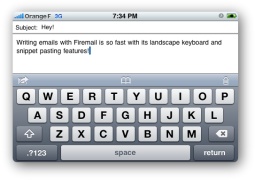
I’ve always detested one (or two) thing(s) about my iphone. My primary moan? Why not make the landscape keyboard more widely available? On a scale from 1 to 10, using a portrait keyboard to type emails on an iPhone is immensely sucky.

Apple made landscape work in Safari; if you’re in the browser and have to type (in the URL, or in a form) the keyboard pops up in landscape mode. This means the keys are bigger, more widely spaced, and significantly easier to tap. This is good usability. In either SMS or email mode, I can only use the portrait keyboard. This is poor usability. Given the fact that the capability exists, I can’t see any reason not to make the functionality universally available.

Lots of people told me that I’d get used to the keyboard if I gave it enough time. They were wrong. It sucks. It sucked a year and a half ago, and it sucks now too. Hence my joy, my excitement, my joie de iPhone that Firemail exists. Firemail is an application available in the App store that lets a user type emails with a landscape keyboard. Lawdy lawdy, I thought the day would never come. The folks at Conceited Software are to thank for this handy piece of code. Let me do so now. Thank you Conceited Software. Try not to let it go to your head. Pun intended.

Now, the mechanics of the thing are not entirely ideal. In order to write these blessedly quick and easy to type emails, you have to load Firemail from your homescreen, not the email app. When the app opens you will be able to compose a subject and message. Once done with your composition you can save a draft (called a bookmark) or send to email. This is great for writing a new email. But what about replying to old emails? That too is possible, here’s how:

  • Open your email app
  • Open an email
  • Hit reply
  • Hit the home button
  • Open Firemail
  • Draft your response
  • Select “Send to Mobile Mail”
  • Boom shaka laka. Your email is now a reply to the email you were reading before.

I didn’t even know you could do this till I read a couple other reviews of this app. iPhone Hacks put a great one together, and so did Ben Boychuck at Macworld. Personally, I think it’s a very strong app, and it has a place on my homescreen. I do wish it integrated a little more seamlessly with the iPhone email, but it’s a very solid app and allows me to do something that’s frustrated me since my very first week with the iPhone.

The app used to be free – it was free when I downloaded it a couple months ago. Now they charge 99 cents for it, and I think it’s definitely worth that fee. It turns iPhone email from something frustrating and terrible into something that’s reasonably not sucky. If I were forced to give Firemail a numeric rating between 1 and 10, I’d call it a 7.

This entry is also posted at 1TO10REVIEWS.

Firemail demo on 12seconds.tv

Holiday TextExpander Giveaway Contest

Monday, December 22nd, 2008

You may remember our post showing how to automate Bit.ly using AppleScript
and TextExpander
. Since then, TextExpander has been bumped up to version 2.5, and in doing so SmileOnMyMac included our bit.ly URL shortening script in the new release.

To celebrate we’re having a holiday contest and giving away two TextExpander licenses!

Contest the First:

TextExpander has one of the cheekiest registration screens around; it offers up data on how many times you’ve triggered an abbreviation, how many characters have been replaced, and how much time you’ve saved typing. The first license will go to the reader who guesses the number of characters (as of the time of posting) that TextExpander has spared me from typing. The Price is Right rules apply: closest guess (without going over) wins.

TextExpander Register Screen

Contest the Second:

This started off because I came up with a new snippet; now it’s your turn. The second license will go to the reader who suggest the best idea for a new snippet, as judged by the LiveDigitally team. Extra points for contest entries with working code snippets. (You can download the trial version to get started.)

Submit your guesses and ideas in the comments (you can link to a blog post if your idea is too long to fit.) The contest deadline is midnight on Wednesday, December 31st, and we’ll announce the winners in the new year. Good Luck!

Video Recording on my iPhone… or very nearly (thank you 12seconds)

Thursday, December 18th, 2008

Disclaimer: We know, love and work with the people from 12seconds.  Impartiality is severely dented, if not discarded outright.

Today 12seconds.tv did a few cool things:

  1. They’ve re-designed their website – cool new look and feel, with a strong focus on video consumption
  2. They’ve concluded their invite-only Alpha phase and opened up in a public Beta where anyone can register and use the site
  3. They’ve had their iPhone application approved and launched in the iTunes App Store (for $0.99)

I’m happy for their progress from Alpha to Beta, and I think the re-design looks great.  But I’m most excited about the iPhone app.  You all know (both of you) ;) that I’m an iPhone user, and one of my few frustrations with the device has always been the lack of a video recorder.  Apple steadfastly refuses to release one, and there’s no third-party video recording application available (unless you choose to jailbreak your phone). This annoys me.

12seconds did not manage to sneak a video recorder through Apple’s QA team.  But they did create about the best possible workaround.  App users will take 3 photos (or choose 3 from their picture library), record twelve seconds of audio, and then post their creation to their 12seconds account (unregistered folks can create an account on the fly, in their phone.)  Somewhere in the cloud, the pics and audio are combined and then spit out as a twelve second video slideshow.  Users can email a link to their video directly from their phone  Each video has it’s own unique URL on 12seconds.tv, and can be emailed, embedded (as HTML) or downloaded onto your hard drive.  Here’s a demo video on how to use the app.

iphone app for 12seconds.tv from Sol Lipman on Vimeo.

One thing I really like about this app is the story telling aspect.  The series of pictures with audio narration really give you that James Earl Jones feeling of comfort.  Also, if you flub the audio and need to re-record, you can do so as many times as you like.  With traditional video, if you blow it, it’s blown.  The moment has passed. Here’s one video I recorded with a trial version of the app.

Cold Cuts – Chinese Food Style on 12seconds.tv

The app is a first draft.  It works, and it’s intuitive, but there are some features I’d like to see added, including wanting better flexibility in choosing photos and saving drafts.  But on the whole I think the app is very usable.  There’s just room to improve.

Kudos to the 12seconds team on a great launch and a cool app.  This is the best solution to the video-recording conundrum that Apple’s created that I’ve seen yet.

Related Posts:

MG Siegler at VentureBeat

Greg Kumparak at MobileCrunch

Rodney Rumford at FaceReviews

This post is also published on 1TO10REVIEWS.

Netflix on the new XBOX 360 Live – disappointing so far

Sunday, November 23rd, 2008

On a scale from 1 to 10, the Netflix / Xbox experience is slathered in weaksauce.

I have an Xbox 360. When I heard about the new Xbox Live experience (new UI, new architecture, more features, more customization, etc.) I thought it sounded really cool. I’ve always thought it was a neat product, but I also thought there was a better interactive experience waiting to be enjoyed, if only someone would come along and develop it. Last Thursday, November 20, 2008, that experience became available for everyone.

One of the features I was most interested in was the Netflix streaming directly to your Xbox 360. I believe that digital home media have a long way to go. Networked media PC’s are a pain to set up, streaming media servers even more so, and Apple TV (even with Apple’s vaunted user-experience) isn’t an elegant or simple solution. But I have an Xbox 360, a computer (for all intents and purposes,) already hooked up to my television and with an HDMI connection.   Netflix streaming directly onto my TV? Sounds excellent.

I even resurrected a membership for this. I had Netflix a long time ago, and ended up canceling because I just didn’t get enough value from it. I get lots of movies from the Library (I know, laugh all you want, but’s it free) and I felt like I was always forgetting to return the Netflix discs and just throwing money away on the membership. So I canceled. But this Xbox partnership seemed like a good reason to renew the subscription, because of the ease, convneience, and my sheer exuberance at the prospect of streaming it right on to my Xbox. Then reality set in.

I just re-subscribed to Netflix, activated my account on the Xbox, and added (hang on) 39 movies to my queue. Thirty-nine movies. Of those, not one is available to stream the Xbox 360.  Not one.

Now that, my friends, is weaksauce.

And before you retort smartly, let me say that this is not just a bunch of brand new, extra fun movies.  Among others I have indies (Run, Fat Bot, Run – 2007), thrillers (Revolver – 2005), TV (How I Met Your Mother Season 1 – 2005), Action (Blade – 1998), Sci-Fi (Resident Evil: Extinction – 2007), and comedy (Forgetting Sarah Marshall – 2008) to name just a few.  There’s a good blend, in my opinion, of older and newer, hotter and less-hot choices in my list.  And none of them are available to stream.  That’s not acceptable.

After searching diligently I did finally find one movie, National Treasure 2, that was available for streaming to Xbox Live, and I wasn’t wholly opposed to watching it.  It worked flawlessly.  I’ve never watched any of the National Treasure movies, but my wife convinced me that I might like them, so I gave it a shot.  Truthfully, I enjoyed the movie.  Low expectations help a lot, and the history is a lot of fun.  But more importantly, the Netflix experience on the Xbox 360 was fantastic.  Moments after adding the movie to my queue, the Xbox Live page displayed it as available.  I asked to watch the movie, and in 15 seconds it was ready to go.  The picture quality was excellent, and the controls all worked perfectly.  I was REALLY satisfied with the experience of using Netflix.   Unfortunately, there’s not much for me to watch.

Netflix and Xbox have bragged that there’s a library of 12,000 shows to choose from and stream to your Xbox 360.  That’s not real helpful, if I don’t want to watch any of them.  I am sadly unimpressed, and if I were forced to give this a numeric rating between 1 and 10, right now it would get a 4.  I like the idea and the service worked well, but there’s no content I’m interested in seeing.  No bueno.

Some Related Stories & Links:

News 4 Gamers

Gizmodo

CNET News

Tom’s Guide

—————————————

Update 11/30/08:

I’ve been thinking about this situation some more.  Jivebotic and Wunder both left very good comments (on 1to10) about what movies are available, and the benefits of the Xbox / Netflix experience.  I agree with both of them.  The way I see it, there are two major problems:

1. There’s still not enough good content available on the Xbox.  Jivebotic pointed out some good movies that I can watch, sure enough.  But they’re still not the ones I want  to watch.  I don’t know why that rubs me the wrong way, but it does.  Out of 40 or so movie titles that I want to watch, I should have been able to find a couple that were available.   For me, there was not one.  

2. Netflix needs to add some kind of serach and identification mechanism, and that right quick.  Currently they do identify their “instant” titles, but there are 4 or 5 different “instant” mechanisms for streaming movies, and not all titles are available for all mechanisms.  I need a way to search for Xbox-compatible films, they need to visibly tag those films with an Xbox logo, and they need to quickly add more titles if they want to keep my business.  

This post is also available on 1to10reviews.

Sonos + Pandora = 42

Tuesday, October 28th, 2008

My insufficiently geeky readers probably won’t get the 42 reference, so I’ll assume you read this reference before continuing. Of all the convergence I’ve seen that bridge gadgets with Web services, I think the implementation of Pandora’s free Internet radio service onto the Sonos music system is probably the best.   The single “snag” in the entire system is that you actually need to (1) have a Pandora account, and (2) own a Sonos.  If you don’t, I recommend correcting the situation immediately.

In a nutshell, Pandora works by building “radio stations” based on artists and/or tracks you like.  If you pick Frank Sinatra, boom, you have a Frank Sinatra Radio Station.  Add other artists, and create your Smooth Crooners Radio Station.  If you don’t get it yet, well, go to Pandora and set up an account, it is free after all.  The super delicious part of the story is how well they integrated with Sonos.

On your Sonos, you simply need to add your Pandora username/password, then you have access to virtually all Pandora features.  Key to it is how easy it is to use on the Sonos, including bookmarking content and creating new stations.  One of the softkey (programmable) buttons is labeled “ratings”, the other “Pandora”.

Click “ratings” to rapidly Like, Dislike, or Not hear a song for a month.  Perfectly logical, works just like Pandora on the Web does.  This feature is one of the key parts to how Pandora works – while you can’t specifically pick songs to play, the collaborative filtering system (recommendations) works extremely well.

The “pandora” button allows you to add the given song or artist to your current radio station, or build a new station based on the song/artist.  Again, this implementation is exactly how it should work.  Within minutes I created five different stations, all in different genres, with practically no effort.  You can similarly bookmark content to retrieve later at pandora.com.

I’ve ripped my 800+ CD collection into MP3.  We have access to tons of other streaming Internet content.  I can say without hesitation that 90% of my Sonos listening will now be over Pandora (and my new house has 7 Sonos zones planned).  Amazing job to both companies.  BTW, Sonos also introduced an iPhone app, but since I’m not an iPhone guy I’ll let the pro’s talk about how great that is instead…

Review of Suunto Core Wristop Computer

Friday, August 22nd, 2008

I bought a Suunto Core watch, in orange. I like climbing, and being in the mountains, so a watch with an altimeter makes at least some sense, which helps me justify the purchase of this rather expensive watch wristop computer.

Suunto is probably best known for their dive computers, both wristop computers, and the kind that attach to a SCUBA diver’s regulator. However, they also make several lines of outdoor / mountain oriented wristop computers. And they have a long history of excellence in manufacturing compasses.

An outdoor, mountain-oriented watch / wristop computer should include a couple of important features:

  1. It should tell time
  2. Effective alarm(s)
  3. Luminescence (push button, generally) for night time use
  4. Altimeter (this tells your elevation)
  5. Barometer (for monitoring changes in air pressure, a good signal of impending stormy weather)
  6. Compass
  7. And a bunch of other things like difference measurements, logbooks, “start from zero,” depth measurements (for when you go under water), rotating bezel, button lock, etc.

There’s a cool video that shows a bunch of the neater features. Check it out.

Truthfully, what initially caught my eye was the look and style of this watch. Many would call it garish. I call it me. I love the color orange, and I think the palette and style of the face itself is magnificent. My affection for the rubbery orange band ebbs and flows, but that’s easy to change. There’s a high-quality double hinge on both the top and bottom bands, which is an incredibly strong mechanism, and a good sign of quality.

If you’re not as into orange as I am, Suunto sells this watch in a number of different guises, both plainer and more grandiose than my selection. (See choices to the left.)

Aside from the aesthetics, this watch packs a lot of impressive features into a small package. Aside from telling time, my favorite feature is the altimeter. It’s necessary to calibrate it correctly; this can be accomplished either by knowing your current elevation and setting it accordingly, or by a trickier method involving the calibration of the barometer function (which is also very cool.) Truthfully, the manual on this sucker is extensive, and I have not quite waded through all of it yet. However, the watch, alarm, calendar, stopwatch, light, button lock, and basic altimeter have all fallen before my wily charms. I also had some help from my wife who is usually cleverer than me when it comes to gadgets, buttons, sequences, and other things requiring both patience and logic. Those are not my strong suits.

It’s fairly large compared to an average wrist watch, though not excessively so. It’s very comfortable, and not overly heavy in spite of its bulk. Sometimes if it slides forward and when I bend my wrist it gets in the way. Also, if I’m resting my hands on the edge of my laptop to type, the band can interfere with my personal ergonomics. Small price to pay for fortune and glory, but it’s an issue nonetheless. It’s also waterproof to 30 meters, which is not diving depth, but certainly has you covered for showers, swimming, or even most snorkeling. For more extensive water activities (like SCUBA) you might look at some of their other products.

This device is not cheap. The retail on the orange model is around $350. The least expensive Core model is $250 (in black and yellow.) You can purchase it through any number of online retailers, including Backountry.com. If you want to see one in person, REI carries them, and many high-end, well stocked outdoor retailers will also probably carry them.

If you’re looking for a distinctive looking and expensive wrist watch, or for an extremely feature-rich, mountain-focused wristop computer, this is an outstanding purchase. I highly reccomend, and if I were forced to give it a numeric rating I’d call it an 8 out of 10. I will update this review after my next big outdoor trip.

Here’s a video review of the Suunto Core in twelve seconds:

Suunto Core Wristop Computer on 12seconds.tv

This review is also posted on 1to10reviews.


Customers Speak, Netflix Listens, Everybody Wins

Monday, June 30th, 2008

I am a huge believer in the voice of the customer.  When I was at Sling Media, Blake (CEO/cofounder) made it abundantly clear how important each and every Slingbox owner was, and we built both the marketing and customer service departments around that vision.  When a user had a complaint, we listened and responded, and when they had a suggestion we took it and considered how to include it.  This behavior is generally Not the way a public company reacts.  Typically when a big company gets on the soapbox and preach from on high, we as customers have to take it.  Our usual means of feedback or commentary was through our checkbooks.

When Netflix announced they were removing the profiles feature, many users (myself included) spoke, and spoke loudly.  We didn’t have to unsubscribe right away, because we had a platform for being heard.  Netflix’ blog allows for comments, and everyday people could blog, twitter, post upset messages to their Facebook walls.  The question I wondered was: were they listening, or was the decision a foregone conclusion.

I read today that the profiles feature will not disappear the way of Kozmo this Sept 1.  I applaud the company for having the confidence to overturn a “final” decision.  Some will clearly yell on high about how “social media” made a change, which is neat.  The real instrument of change is something as simple as creating a culture that is open to listening.  The voices were always there anyway.

AMAZING Lego town at Maker Faire

Saturday, May 3rd, 2008

Good job Comcast!

Wednesday, April 9th, 2008

Turns out the speculation was true, you don’t have to be an a-lister to get attention from Comcast online.  I must say, I’m impressed.  I’ve never seen another company react this way before, and they deserve full praise for such actions.  This is one of those stories that I will definitely be sure to echo in the future.  Well done, no snarky or cynical remarks for you today!

Geeks Done Good!

Saturday, December 29th, 2007

Warning: semi-preachy post. Do not read if in the mood for fluffy banter about some new Web service or gizmo.

We live in a very interesting time. Technology is enabling so many things in so many ways it is truly impossible to keep up with it all. There are more ways than ever for us to spend our money on things that are supposed to make us happy, in the virtual world or the physical one. Yet countless studies have shown that when measured, the impact on one’s happiness from buying things (cars, TVs, gadgets, etc) is extremely short-lived. Volunteering, on the other hand, is considered one of the top activities we can do to directly contribute to our happiness.

Geeks Doing Good @ SF Food Bank

Today I was proud to see 25 Bay Area (and 1 from LA!) people show up at the San Francisco Food Bank to spend a few hours of their time volunteering. We organized two shifts, one at 9am, another at 12:30pm, and at each shift performed various activities to help the Food Bank with their food supply. The Food Bank is heavily dependent on volunteers, so this was a great way for us to get involved with an organization that has a direct impact on the community around us. I have pictures online here (more on Facebook), and Robert Scoble took some videos: quick one with me, and an interview with George from the Food Bank (parts one and two).

Jeremy and Gold ToemanGeeks Doing Good @ SF Food BankVeronica Belmont and Ryan BlockGeeks Doing Good @ SF Food BankEric plays with a box

The morning shift was responsible for sorting recently deposited food from Safeway and individuals. We rummaged through 44,000 pounds (not a typo) of cans, bottles, boxes, and jars of food. All the food donated from Safeway was there because something was ‘wrong’ with it (dents, ripped box tops, etc). It was a bit of an odd feeling knowing I was handling items I’d never consider purchasing, yet would end up in homes where it is desperately needed. Thankfully recent policy changes allow Safeway to donate this food, as in prior years it all ended up in the landfills.

Bryan WhalenVeronica BelmontGeeks Doing Good @ SF Food BankJeremy PepperIlana GaussJoel Sacks

The afternoon group was packing up boxes of food that end up in homes where the only monthly income is social security. The average check is $1005, and the individual is not permitted to earn any money from pensions, 401k’s, or other programs, so they are clearly in serious need of help. For those who don’t think $1000/month is too bad, please bear in mind that in San Francisco, a 2 bedroom apartment easily rents for $2000+ per month. The group’s pace of sorting apple juice, dried milk, canned pork, and other rations into a box was assessed after 10 minutes, and a target for the day was set (as opposed to the morning shift of sorting utter chaos), which was met. Go team!

Jeremy ToemanRobert and Patrick ScobleMehrshad MansouriBen Tan and Gold ToemanMaya Baratz and Megan McCarthyAlexander Grundner

At a personal level, I’ve felt wonderful all day. Considering 25 people gave 3 hours of their days today (Mehrshad actually stayed through two full shifts), that means my real contribution was to generate 75 hours of volunteering. If you’ve ever doubted your ability to make a difference, think about how easy it can be. Now imagine each of these people put forth the same effort next year, and manage to bring along a couple of friends each. And so on, and so on. If you don’t know me well enough that you think I am bragging here, please know I’m not – I’m just genuinely excited to have the satisfaction of feeling I can make a difference. It’s all too easy for us to shrug our arms and put our heads in the sand. My head’s well out, and I’m excited about it.

I’ve gone ahead and registered GeeksDoingGood.com (and GeeksDoGood and GeeksGivingBack). I’d like to use it as a place to coordinate future events. Further, I’m hoping it becomes a collective communal effort. I figure if nothing else I can start a blog there, and maybe do a little (shudder) Twittering. Okay, probably not Twittering, but definitely a cool WordPress theme…If you have any interest in helping out in any way, please get in touch.

Lastly, I’d like to thank Andrew Kippen for organizing with the Food Bank, and I don’t have the full list of attendees just yet, but the ones I’m sure of by name include (in no particular order): Flickr‘s Maya Baratz, Wired‘s Megan McCarthy, eHomeUpgrade‘s Alexander Grundner, Robert Scoble, The Point‘s Jeremy Pepper, my mom (hi mom!), AdBrite’s Joel Sacks, Ilana Gauss, Josh Einhorn, Macrovision’s Ben Tan, Josh Lazar, Mark Trammell, Jason Toney, Mehrshad Mansouri (x2), Patrick Scoble, Phonescoop‘s Eric Lin, Engadget‘s Ryan Block, Mahalo‘s Veronica Belmont, Bryan Whalen, and E-storm‘s Daniel Riveong. I apologize for those I’ve left out, but I don’t have your info nearby, I’ll update this post when I get it. But thanks, thanks, thanks!

I guess the morals of today’s story are:

  1. Yes, one person can effect change.
  2. Sony’s Vaio VGN-SZ series laptops still suck (although I just upgraded mine to run XP, maybe that’ll de-paperweight it).
  3. There are lots of needy people out there and it’s easy to help, we just have to make the time to do the helping.
  4. We can all just sit on our collective butts and complain about the sorry state of affairs in our world, or we can try to make a difference. It’s a lot easier than I thought, and I plan to do a lot more of it in 2008. I hope someday you’ll join me… Imagine.