Archive for the ‘Gadgets’ Category

CES Tips For 2011

Monday, January 3rd, 2011

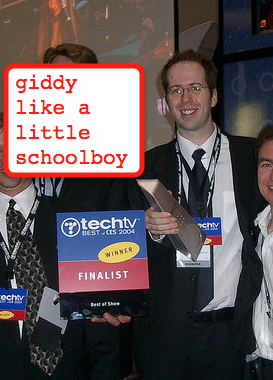
This is my fifth consecutive year of posting Tips for Surviving CES (note – nobody typically dies at the show, so the whole “survival” thing is a bit tongue-in-cheek, though the CES Flu is a pretty much guaranteed thing), you can find prior editions for 2007 (and part 2), 2008, 2009, and 2010.  If I go to the show (game-time decision due to recently expanded family) it’ll be my 11th consecutive time attending (there’s a picture of me winning best of CES in 2004 – gosh I look young!).  Much like the past few years, little has changed, so here’s the minorly edited version…

  1. Wear Comfy Shoes!
    Of all the feedback I get on these lists, this is the one people appreciate the most.  CES isn’t supersized like it was back in ’08, but it’s still big, and tired feet equals sore back equals unhappy attendee.  Freebie bonus tip: while walking the show floor, try to walk on the booths as they tend to have better padding than the walkways between booths.
  2. Stay Clean
    I’m not a purel fan in general, but for a show like CES with over a hundred thousand people visiting from every continent, you are guaranteed to bump into someone who has exposure to some bizarre strain of something that’s going to make your next few days pretty miserable.  Keep your hands clean, wash before every meal and snack, and you’ll at least up your odds of avoiding the CES Flu next week.  Good luck.
  3. Pack Light
    My recommendation is to walk the floor with either nothing or a near-empty backpack. Forget shoulder straps, you’ll be aching by the end of the day. Bring nothing you do not need during the day. Also, try to dump your bag prior to dinner, so you can spend the night on the town without having to remember anything later. What happens in Vegas…
  4. Be Nice to the Staff
    Booth workers have likely sacrificed their entire holiday season to prep for CES.  They have to answer a thousand questions or so an hour.  Their demos are probably going to go awry as they are probably dealing with brand new gadgetry that doesn’t really work so great.  Treat them nice – don’t pester them as if they are tech support – they aren’t.  Don’t ask them hour-long questions on some weird technology nuance.  Don’t badger.  And don’t suck up all their time considering there are folks standing right behind you with questions to ask too.  Just be nice, they could use a little break from time to time.
  5. Plan Everything
    Figure out which booths in which halls you are going to prior to getting there.  Figure out where your dinner is, and book enough time to get a taxi.  Figure out where to get your badge before going there.  Figure out where your parties are, and plan that properly.  ”Winging it” utterly sucks when it comes to CES and Las Vegas.   Traveling between any two destinations could easily take an hour, even as early as 8am. If you try to leave the show, go to a hotel, then come back, your day is done.
  6. Skip the Swag
    Do you really want a Panasonic pen, or a Sony plastic bag, or a brochure from TiVo? Really? My wife has actually forbidden me from bringing home anything, period. Also, for those of you into conservation (which should be, you know, everyone), no better way to send a message than to leave Samsung with an extra truckfull of mints (note that for the 2011 edition I changed LG to Samsung, just for funsies).
  7. Stay Hydrated
    If you carry only one thing (a simple backpack, remember?  no?  back to #3 for you!), it should be a bottle of water.  Also, since your hotel room will be quite dry, leave the bathtub 1/4 full of water overnight, you’ll feel better in the morning.
  8. Get Connected
    Since about 80% of everyone at CES will be using an iPhone, odds are y’all won’t have much of a signal.  Further, wifi is going to be spotty at best.  I recommend relying on texting as your go-to method of staying in touch with folks.  Either that or grab a MiFi for the week.
  9. Share Cabs!
    When you get to your hotel taxi line in the morning, and it’s huge, here’s a simple trick to save yourself 30 minutes per day(or more).  Walk to the front, ask if anyone’s going to the convention center, if they say yes, offer to pay for their cab.  You aren’t actually “cutting” in line, because the person who was 2nd in line remains 2nd in line and you have no impact on their wait.  Easy one, eh?  By the way, you should be sure to tip a little extra when you do this, since you’ve taken away a full fare.  Plus, sharing is caring (I don’t know how that fits in here, but it sounds so nice to say).  Oh, and don’t forget – you can’t hail a taxi in Las Vegas, so grab them at hotels, restaurants, or the LVCC.
  10. Layer Up
    Vegas is in the middle of a big desert, and while it may be warm during the day, the nights are very cold in January.  Bring a jacket or a sweater when you go out.  But don’t forget to leave your CES badge in your hotel room before you leave for the night!
  11. Bring Business Cards
    I would say roughly 97% of the people that I’ve met at CES over the years who don’t have cards regret not having them. Maybe it seems cool now not to carry them. Maybe you think they are so 1990s. The truth is, there’s almost no reason not to carry cards, and even looking at it from a potential loss vs potential gain perspective says: carry the darn things! And Moo cards don’t count, people.  Updated for 200920102011:  Still true.
  12. Follow Live Online
    Engadget puts up a post every 3.8 seconds during CES (this is not a fact, I am just guessing – it’s probably more frequent than that). Make sure you tap into theirs (or Gizmodos or your own favorite gadget blog) during the course of the show.  If you are AT the show, you might find out about something cool to see; if you are stuck in your office, it’ll be kinda like being there, except you are stuck in your office and they’re in Vegas. Loser.

And there you have it, the elusive Top-12 list in action.  Hope it helps, hope you have fun, hope I can be there myself (can’t break the Ironman streak!!!).

My cord-cut TV set-up

Wednesday, December 8th, 2010

Following my last post, I thought I would explain my personal cord-cut situation and highlight what is working for me (and what isn’t) as I try to enjoy TV without cable.

First off, the main source of video entertainment (both TV and movies) is Netflix accessed via a Roku box.  Yes, we don’t get the latest content and yes, the selection is somewhat restricted, but there is enough there that keeps our interest.

I’m also a huge fan of webTV, which I access on Roku or online from my computer (my wife thinks I’m nuts, for a bunch of reasons of course, but my webTV hobby is one of them.)

The big gap here is sports. I get around this because I’m simply not a sports fan, so even if I had cable I wouldn’t watch a lot (or any) sports. (Full disclosure: I saw, and loved, the Vancouver Olympics on cable before I cut it)

I did get an MLB.com account (and jump on the bandwagon) to watch the SF Giants in the World Series. I loved the experimentation of it all and found the experience to be good.

The one sport I do enjoy (and miss dearly) is Formula 1 racing. Right now, I have no good way to follow my favorite fast cars. I read some of the updates online but that is a very sad alternative to watching a thrilling race live.

Also, HBO… That is another huge gap in my viewing pleasure that I miss. We get a lot of the shows on DVD via Netflix but it would be beyond fantastic to have a streaming solution.

As far as news and current events, I get that online, in magazines (I love magazines) and increasingly via electronic magazine purchases on my iPad.

My next moves? Well, I’ll be getting an HD antenna soon to watch over-the-air TV. This will let us watch some interesting shows and hopefully some big events, like the Oscars. I was considering Hulu Plus on Roku but it sounds like that offering isn’t as complete as it could be, so I may wait it out.

Two other disclosures:

1) I’m actually skeptical that this whole cord-cutter thing is a really huge trend. I think people will come back to cable once the economy improves and once cable companies up their PPV game. Cord-cutting will increasingly be a viable option, but it won’t have huge adoption in the mainstream.

2) For the record, I’m not a cord-cutter out of some religous hatred for cable companies. They aren’t my favorite companies in the world but they’re better than oil companies. I’m a cord-cutter for fun. I think it is fun to fiddle with gadgets and find ways to watch TV on my own terms.

Plus I’m super-cheap and I love saving the $60 a month. (If you cancel Comcast Xfinity triple play and get Internet and a landline separate, the savings is about $70… not a lot but I’ll take it.) Factor in the $10/month for Netflix and you walk away with $60 in your pocket and a chance to play with all the inputs on the back of your HDTV.

How to Succeed at I-Stage 2010

Tuesday, October 12th, 2010

Next week 9 companies are taking the stage, er i-stage, to showcase their aspiring visions of future gadgetry.  This is the third year for I-Stage, and I’m pleased as punch to participate as a judge (along with ReadWriteWeb’s Richard MacManus, TechCocktail’s Frank Gruber, and Best Buy’s Rick Rommel).  This is not my first experience with the event, as I was supporting Boxee at the inaugural event two years ago.  That experience plus my time at CES and my numerous times at the Under the Radar events has me putting up this post, with some final words of wisdom (?) to this year’s finalists.  This list is not in any particular order.

  1. Practice! You have a week to go, if you are spending any less than an hour a day, you are not devoting enough time to the demo.  If you think Steve Jobs “wings it,” try holding a MacBook on the tips of your fingers and keeping it perfectly level for more than a second.  This Friday I’d spend as much as half of your day rehearsing, then keep it light over the weekend – think about how marathoners practice.
  2. Practice in front of an audience and/or camera.  Every rehearsal should either have a live audience (peers, friends, employees, strangers, spouses, pets, whatever) or be in front of some form of video camera (we use Flips at our office).  You’ll never take it seriously if you don’t feel there’s some form of audience, and it’ll help you find areas to improve.  BTW, I’d think it goes without saying, but watch the videos after you are done!
  3. Lock things down. You should be playing with your “Real” demo right now, and avoid changing your codebase as much as possible.  Further, if you feel you must continue to tweak, keep backup builds/demos ready so you can revert to stable versions.  And bring those with you, just in case.
  4. Be very redundant.  Need an HDMI cable? Bring two (or three).  Have a local server?  Have a second laptop with an identical build.  You might be able to run out to Radio Shack the morning of, but you really don’t want to.  This goes for mid-presentation as well – if you had planned to do something, and it just isn’t working out, be ready to swap out with a secondary version instead at a moment’s notice.  You should probably practice that too.
  5. Make sure we understand your… (whichever are applicable, odds are most of them)
    1. Vision
    2. Product
    3. Target Market
    4. Pricing
    5. Distribution
    6. Differentiation
    7. Technology
    8. Strategy
    9. Plan
    10. Benefits
  6. Emphasize benefits. As an example, the technology behind SMS is uninteresting, whereas the benefit of being able to send short text-based messages to your contacts is huge.  Focus on the way your technology & features benefit your target users, not the technology & features themselves.
  7. Prune your pitch.  You only get 3 minutes, which is NOT much time!  Your pitch should be fine-tuned, with literally every word mattering.  Don’t show esoterics, don’t show fluff, and don’t try to wow us with “me-too” elements of your features (“look, it even tweets!”).
  8. Show off. Show us what makes you special, different, distinct.  Show the steak and make it sizzle.  Show the amazing features and the corresponding benefits.  Show the vision.  There’s a huge difference between “fluff” and “sizzle” – find it, and show us!
  9. Plan on reliable stuff. Power is reliable.  Computers are pretty reliable.  WiFi can be unreliable.  Cell networks are unreliable.  Prototypes are unreliable.  Beta software is unreliable.  Real-time is very unreliable.  Waiting for Internet results for anything is highly unreliable.  You should not have anything unreliable in your demo – as I said before, with only 3 minutes you don’t have much wiggle room if you are depending on a real-time Internet lookup of something over a 3G network with geo-tuned services.
  10. Entertain us.  Now that your demo is all set, you’ve practiced, it’s reliable, your pitch is solid, etc, it’s time to add a little charm.  Make a joke.  Do something interactive with the audience.  Show some color.  Do something that takes your pitch beyond “just a demo”.  At the very least, smile and make eye contact!
  11. Avoid cliches. Please, no references to jetpacks, flying cars, or laser guns.  Seriously.  And nothing about lists that go to eleven.

Good luck inventors and entrepreneurs!  We’ll see you next week.

ps – one more tip: pack layers, its cold in San Francisco.

Quick Hits: Sony Remote Monstrosity, Early Revue Reviews, Android #1?, iPhone-to-TV, Congrats Foundry Group!

Wednesday, October 6th, 2010

Sony Remote Monstrosity
Engadget got a sneak peak of the Sony/Google TV remote control.  It’s either hideous, or simply an internal prototype used for them to develop with.  I wish it was the latter, but bet it’s the former.  Over on the Stage Two blog (I’ve been doing a lot more blogging there recently, it’s not just us pushing client work, give it a read!) I go into specifics of what’s wrong with it, and also tangible steps on how to improve it.

Early Revue Reviews
Saw a quick hit on CrunchGear today, I’m in complete disagreement with everything they say that makes it “good”.  My highlight nitpick is their closing remark: “As we said before, the real initial value will come from the camera that Logitech is selling for video chats on the TV.”  The real value of a $299 device is that you can hook up a $149 camera to it to do video chat?  Really?  That is going to move the needle on Revues?  Hint: no way.

Elsewhere, my friend Harry calls it the Swiss Army Knife of Internet TV products.  I’d say that’s a great analogy, but follow up with my biggest concern: the TV is the one place we don’t want something like a Swiss Army Knife. See, those Knives are handy to have around in a pinch, but in every way fall short of being really useful for a long period of time.  Yes, it’s cool to have a philips head screwdriver in your back pocket when camping, but I wouldn’t put together IKEA furniture with one, that’s when you need the actual screwdriver – aka the single purpose product that works really really well.

I’m maintaining my position that Google TV 1.0 is not ready for consumer primetime, and neither the Sony nor Logitech solutions are compelling to the mainstream.  Sorry to my friends who work at those companies, but this just isn’t what it needs to be for a big win.

Android #1?
I saw one of those big flashy attention-grabbing headlines today “Android Most Popular Operating System in U.S. Among Recent Smartphone Buyers”.  Beyond my general disdain for Android (though I will freely admit the HTC Incredible running Android 2.2 is leaps and bounds ahead of my old Eris, but still has lots and lots wrong with it – for another time), I hate headlines like these.  What would be MORE interesting?  What is the popularity of Android specifically on AT&T?  That’s at least apples-to-apples comparison (pun fully intended). Of course
Android is going to hit the top spot, this is inevitable, not interesting.

Now what would be interesting?  Well, since this is arguably all about a landgrab for developers to adopt platforms, how about an analysis that talks about which platform is making the most money to developers? Until Android/Google makes the process of buying (and selling) apps easier for everyone, the money is still flowing to Cupertino.

iPhone-to-TV
The newest version of Netflix for iPhone enables watching the movies on a TV, rather than on the phone itself.  Very cool, nice novelty feature.  But when I see a phrase like “Who needs an Apple TV now?” I get reminded of how often people in the industry aren’t thinking these things through very much (no offense to the author of that particular blog post).  To be clear – a phone, even an iPhone, does not replace a TV dedicated device, now or ever.  Wrong device for the wrong purpose.

What if you need to make a phone call mid-movie?

What if your phone runs out of battery?

What if your phone drops the signal (apparently those iPhones are known to do that from time to time)?

What if you want to put the movie on, then sit 8-10′ away from the TV, and, say, pause or rewind the movie?

etc.

Congrats Foundry Group!
Just wanted to take a second to congratulate Brad, Ryan, Jason, and Seth at Foundry Group for raising their latest fund! I’ve had a long history with the guys and a lot of their investments, and since they are one of the few VCs who love the consumer gadget space, wanted to give them a little shout out here.  Keep up the great work, and keep finding the cool gadgets!

The difference between Fragmentation and Disparate Products, a counterpoint

Saturday, October 2nd, 2010

My friend Louis Gray wrote a piece tonight mostly about the new Apple TV, but focusing on how he believes Apple is introducing fragmentation into their ecosystem.  Go ahead, give it a read.

I was writing the following as a long comment, and just as I was wrapping up I thought it would serve better as a blog post.  Please consider it a counter-point, and you should definitely read Louis’ arguments first.  Go ahead, click there, then read all the way through the comments until you get to…

“I’ve yet to see anybody dispute the facts about each device running a different flavor of the OS, which is the crux of the issue.”

The reason nobody’s disputing it is because it’s not actually an issue.  Apple does not, for the most part, have fragmentation in their platforms (other than tiny exceptions, which I’m sure someone will point out snarkily in the comments).  This is about disparate products, not a fragmented operating system implementation (though I do completely agree that the iTunes experience is woefully out of date within the overall product line Apple sells).

First, all the comparisons about what does/doesn’t play on Apple TV on day 1 of shipping are irrelevant – the wide swath of Americans who will buy the device will pick it up later this year (you know, November-ish), by which time the content library will be different.

Second, it’s not as if there’s any cross-product features, other than the few apps which happen to run both on an iPad and on an iPhone/Touch.   When we talk about Android fragmentation it’s because all the products are being labeled as having a common platform, yet there is MASSIVE discrepancy between user interface, app compatibility, features, etc.

Third, Apple isn’t out there marketing “iOS 4 devices” other than when it needs to in re updating iPads/iPhones.  And even then, it’s highly product-specific.  Android, on the other hand, *is* a promise/value expectation (and I’ll avoid commenting on the quality at this point).  When Google touts new Android features and someone with a Droid Eris (my former, sad sad sad phone) hears about them, they have *NO WAY* of knowing they will never ever get them.

Fourth, and last, is about the developers.  Ultimately fragmentation is most keenly an issue to them (even more than consumers), as it impacts their livelihood.  So if you are developing for Android, yet your app won’t run on the mega-phone Evo, and runs poorly on a Droid X, but is nice on the HTC Incredible (my current, much better, but still lacking phone), how are you supposed to communicate that to consumers, who will inevitably write poor reviews, not trust your brand, and ultimately not spend money with you.

That’s the problem with fragmentation.  Now let’s look at developers for iOS – they know exactly (1) how big their market potential is, (2) where the money is flowing, (3) how to build apps within the ecosystem, and (4) with 100% certainty, which devices their apps will run on.  A bad user experience is utterly the developers’ faults, not due to some random hardware maker poorly implementing an OS.  And if/when Apple TV gets iOS 4 (my prediction is it doesn’t happen until the next version of the device, but I’m getting a lot of these wrong these days, so who knows???), developers will have a clear path to build whatever apps they can, knowing exactly how they will perform.

Rooting for Roku pt.II

Tuesday, September 28th, 2010

OK, so the other day I made the comment that in order to compete with all the other media streaming boxes out there, Roku should look at really doubling down on more content.

Shortly thereafter, Netflix (another one of my absolute favorite companies) announces a partnership with NBC, thereby giving Roku a helping hand (and yes, other Netflix boxes as well.)

And now this, Roku skillfully lines up Hulu Plus as a content partner. Actually, from my perspective, this is a bigger win for Hulu. As of now, I had held off of getting a Hulu Plus subscription but now, seeing that it will be on my Roku, I may just sign up!

Now with Roku you get Netflix, Hulu Plus, Pandora, Amazon and a bunch of other content providers, plus 1080p output, plus USB playback all at a sub $100 price.

Sure, none of these content partnerships will be exclusive, but Roku provides them all in such a neat, easy-to-use box that is available now.

So remind me, why would you be interested in any other offering out there?

(If they come up with a new UI, I’ll be in TV heaven)

Rooting for Roku

Thursday, September 23rd, 2010

Hello,

I’m a longtime fan of LiveDigitally but a first time contributor. Jeremy has been kind enough to invite me to write for the blog whenever the mood strikes and today seemed like the perfect day for my inaugural post.

Picking up on previous posts on what makes a great Google TV or Boxee app, I thought I’d jump in with some thoughts of my own on one of my favorite devices, the Roku box.

I got my Roku about four months ago and I love it, I really do. It gives me about 75% of the content I would want on my TV, which was enough to get me to “cut the cord” and cancel my cable subscription. So for the past few months, Roku has been my rocket ship to the TV universe.

I haven’t seen Roku’s latest offerings, but here are some thoughts on what I have seen and heard about their current boxes:

  1. Roku wins universal praise for its ease and setup, but not so much fanfare for its UI; I can’t disagree. The box is dead-simple to set-up and use, which is great. But the UI is uninspired and doesn’t really encourage you to really delve in to what is on offer
  2. Another piece of high praise is reliability, my box hardly ever flakes and we put it through the ringer. It is hard-wired into my router so I can’t vouch for the wifi capability, which appears to be improved in the new boxes launched today
  3. Content: At the outset, Roku was essentially a Netflix box. That was great a year-or-so ago but now, everyone and their brother is a Netflix box. Roku has some nifty content like MLB, Pandora, Amazon and a few others, but they need to continue to expand with more mainstream stuff.  Apple has Netflix and just scored ABC and FOX. It isn’t a huge leap forward, but it may be enough to peel off Roku users.
  4. Developer community: Related to the content problem, I know from some developer friends that Roku isn’t the easiest platform to develop on. Obviously this is a problem as competitors, both large and small have strong developer communities. Difficult development platform=difficult to get the choice apps/content.

Some of the pet peeves that are missing from my current box have been addressed by the new ones, the biggest being previously a lack of USB. With my current XR, I don’t have USB to view my own content, which is frustrating. Happily, that has been solved with the XDS

But even as it evolves, Roku is firmly staking ground in the low-end market, which I think is a good move.

The big battle around media-streaming boxes will be around price/performance; Google TV seems to be on the highest end, with estimates that their box will be in the $200-$300 range, Boxee is next at under $200, with Apple TV and Roku coming in at the sub $100 range.

GoogleTV and Boxee promise a more active experience, with more features, web surfing  etc., but also with a more complicated remote/UI. AppleTV and Roku look to be more of lean-back experience of just watching content via a simple remote/UI.

My money is on the lean-back experience, which I think is more viable for the short term. A simple box that lets people access most of the content they want will be the gateway drug to media-streaming boxes. Boxee and Google TV look/sound great on paper, but I wonder if they may be too complex too early in the lifecycle of this product segment.

Excited About Judging pre-CES i-Stage Event!

Thursday, August 12th, 2010

It’s been official since a tweet last week, but the i-stage website was updated today to reveal this year’s judges/mentors, and I’m extremely excited to have my name in the list.  Other judges this year are Richard MacManus (founder of ReadWriteWeb) and Frank Gruber (founder of TECH Cocktail), and previous judges have included Blake Krikorian (my boss and mentor at Sling Media, currently living mostly off the grid), Ryan Block (founder of GDGT, former editor-in-chief at Engadget), Natali Del Conte (CNET), Ross Levinsohn (Fuse Capital), Jeff Pulver (involved in pretty much everything), and more!  Needless to say, I’m honored to have my name in this list of esteemed technologists!

This is neither my first foray with i-stage nor first judging with CES.  Last year I was a judge for the prestigious Innovations awards.  Two years ago I was working with team Boxee when they went to, and subsequently won, the inaugural i-stage event!  This plus the three “best of CES” awards I’ve been involved in, and I’d say I’m quite excited about being on the other side of things this year!

We haven’t seen this year’s list of contestants (still two days to enter), but I’m excited to see what’s up-and-coming in gadget land (especially since I like to think I’m already involved with most of the new stuff – so this makes it even more intriguing).  I’ll put together some thoughts and recommendations on what contestants should (and should not) do to increase their odds at winning (and while cash is nice (kidding!!!!), I’m more interested in impressive technology and great product experiences).

My guest on Fox News’ Gadgets and Games is online!

Wednesday, May 26th, 2010

Big thanks to Clayton Morris for having me on his show last week.  We talked a lot about Google TV, as well as some iPad cases and some Android chat.  I had a few Skype/headset technical difficulties, but overall it seemed to work quite well!  Was on with esteemed guests Ross Rubin, Dan Costa, and Jeff Pulver.

Two Weeks Later: Why I’m Keeping my iPad

Monday, April 19th, 2010

I purchased an iPad on day one (roughly minute 3), without much assurance as to how or why I’d use it, or even if it would be a “keeper” in my digital lifestyle.  Here’s a recap of my feelings over the past two weeks:

Day one.
Let’s be honest, the first day of any new toy is either “wow this is awesome” or “gosh I’m disappointed”.  Most products don’t get well-tested in their first few hours of use, and it’s generally hard to evaluate the real-world practicality of any device.  For example, a digital camera will take good pictures, but you might not try it in a fast-action setting; similarly a GPS device will get you to your first destination, but you won’t evaluate how rapidly it finds the signal when you are lost up in Tahoe.  My day one was a lot of fun.  I didn’t really “do anything” with the iPad, other than try downloading stuff, typing on the keyboard, doodling in one of the (way too many) doodle apps.  Good times.

Week one.
Within three days I had sync’ed my email, contacts, and calendar to the device, and all worked quite smoothly.  I copied some photos, videos of the kids, some Arrested Development episodes, and some music from my library.  I also experienced my first real “use” of iTunes as a sync platform – it’s okay, but has some bizarre shortcomings that I was quite surprised about.  I downloaded a few apps (all free ones, didn’t want to buy anything yet and still haven’t bought one yet to this day actually),  played with them, kept some, deleted others.

Most of my time in week one was spent using the device in three settings (well, kinda four – read below)

  1. On the bus
    Media device: Watched videos, wrote a blog post, listened to podcasts
  2. At the office
    “Accessory” computer to my iMac:  Mostly light email, calendaring, some Harbor Master.
  3. At home
    Laptop replacement: light-to-moderate email, Web surfing, lots more Harbor Master.
  4. Demo to others
    My fourth scenario was simply showing the iPad to anyone around – lots of inquisitive folks wanting to see it in use. I wish I was getting a commission.

Week two.
The second week of use was my true “now how do I feel” week with the iPad.  Was it actually better/easier/more convenient than my MacBook?  Did I really want to carry this on the bus or other places? Would a murse fit into my lifestyle okay (separate post of iPad cases & sleeves coming)?

The above answers were all “yes”es, and more.  The only three uses of my MacBook last week were: watch NHL GameCenter (Go Habs!), sync and backup digital pictures, and charge/sync content to my iPad.  For literally everything else I used my iPad in lieu of the MacBook.  And not only did I use it, I found myself preferring it for most casual use.  But then this weekend got even more interesting.

On two different occasions this weekend (at a movie theater and while touring farms North of San Francisco) we had the iPad handy to look up long lists of content.  To be perfectly clear, we opted to carry an iPad rather than print out Web pages.  This was a conscious choice, and not in any way for “show off” factor (don’t worry – that was accomplished through plenty of other methods).  It was just an easy way to bring content along with us AND have our calendars AND have email history AND have contacts/address book information.  Things we obviously could do with smartphones (but generally choose not to), paper (ugh), or laptops.  But I’d *never* throw my laptop in the trunk on a day trip – something that just felt natural with the iPad.

It ain’t all kool-aid!
There are certainly flaws with the iPad.  In fact, my evernote-based list of likes/dislikes actually has more entries on the dislike list (future blog post).  It is, unquestionably, about the least ergonomic device I’ve used (the lap-pad pics from their ads are great, but radically unrealistic).   The lack of even simple multi-tasking (mail + calendar anyone?) can be annoying.  They could even take a cue out of Android and include a “back” button that spans multiple apps.  More on this in a future post.  But most importantly…

It’s not a replacement for any computer.  Just some.
As much as I believe the iPad has major impact in regards to light/casual/home computing, I don’t think most households could get by with “only” an iPad.  The lack of ability to effectively handle one’s digital camera needs is a “killer feature” for having a computer.  Further, no businessman could possibly exist on the iPad alone, though it’s an amazing complement to one.  I will say that I believe mail on the iPad vastly outshines any other non-computer device, specifically including BlackBerries, and that’s an important piece of ground for Apple to break.

But it is game-changing, and almost definitely not a bread machine.
I like having the iPad around.  I like turning it on, using it, then knowing it’s still there. It feels like everything the original PalmPilot put into my hands (though unfortunately not my pockets), only in context of computing and the Internet in 2010. I believe my use will only increase, and intend to start purchasing apps now.  It’s probably the most interesting digital accessory one can purchase, and unquestionably dabbles in “computer turf”.  I thoroughly enjoy using it, and find that it is helpful (not harmful) to overall productivity.  Except, of course, when I play Harbor Master.

Tales of Gadget Design: the FlowerPot Gizmo!

Friday, April 9th, 2010

I’ve been asked to write more frequently about building gadgets, so I’ll be putting together posts that reflect the variety of experiences and advice I’ve gleaned over the years. To get this party started (yo), I thought I’d share what I consider to be a fairly amusing, yet quite real, topic: the FlowerPot Gadget Design. The story goes something like this…

You’ve conceptualized some new gadget. It’s going to revolutionize the long-sought-after convergence between microwaves, WiFi routers, and doorbells. The technology is mostly figured out, the first rev of the board design is mostly working, it’s time to start thinking about the actual product now. You hire a top-notch industrial design firm (probably the one who used the coolest method of binding their sketches and/or presentation), share your vision, and await your first concepts.

A few days go by, and their team shows up with a cleverly bound sketchbook, all parties very excited about the upcoming ‘reveal’. Anywhere from 6-12 concepts are shown, some very simple ‘boxes with a mild twist’, some ubercool concepts that are obviously impossible to actually manufacture, and then, there on one of the pages, it is. The flowerpot. You look at it a couple of times to make sure the synapses are firing properly and that you are in fact seeing a flowerpot. And it’s true, you are.

Now I don’t know if the flowerpot originates in design school, or if some legendary designer once waxed poetic on the flowerpot as ultimate incarnation of designing gadgets. I can say I’ve seen the concept presented many times in my career, a surprising amount i’d say. Even last week when meeting a new (and very cool) gadget company when discussing their product strategy I explicitly asked the question if their ID firm mocked up a flowerpot. They showed me the molded sample.

I’m not a designer, but I believe I have a good eye for products combined with a healthy respect for the design process. I know there is often a healthy ‘battle’ between design concept and real world implementation. But I am pretty sure we aren’t going to see very many flowerpot gadgets actually come to market anytime soon, well maybe with an exception here and there.

And then again, maybe the FlowerPot Gadget *is* the future….

the iPad will kill home computing, period

Monday, April 5th, 2010

I’m writing this on my ipad, from the bus, really just to see if I can and how well it works (and how much the motion sickness will hit me by the time I’m done). Note: the preceding sentence was unfortunately all that i recovered after I accidentally quit without saving. But i can tell you i wrote a lot, and am mild to moderately queasy now, but am at a computer to finish it up.  Not for any reasons other than there’s just nothing better than a 27″ screen!

Why am I so bullish on the iPad?  In a nutshell, it does 80% (or more) of the things most people need to do with their computers in their home life.  Here’s a quick rundown on the 5 major components of “common use computing” and the iPad’s “fit” to task…

  1. Email.
    Email is either top or the 2nd-most important personal computing task.  Email on the iPad works great, especially for typical “staying in touch” emails, forwarding along urban myths, sharing funny videos, and all the things most people use email for on a day-to-day basis.  As my last time stating it – this is not about office computing, nor those who are taking office computing tasks and doing them at home!
  2. Web surfing.
    Again, either 2nd or top on personal activities is simple Web surfing.  Facebook, YouTube, viewing photos, reading stuff, playing games, etc.  While there is a major drawback in the lack of Flash, the reality is this will change one way or the other (in other words: either less Flash on the Web, or Flash comes to the iPad) sooner or later.  In my weekend’s worth of use I encountered flash twice, though on the other end my cousin’s kids were rendered practically useless to visit the sites they frequent.  Safari on the iPad is a very nice browsing experience, though I believe it could be improved a lot – tabs, for example, probably do make sense (where they didn’t on the iPhone).  In the “80%” view, it’s definitely above satisfactory.
  3. Media consumption & playback.
    “Stellar” is probably the right word I have to describe the iPad as a media device.   Video looks amazing, music playback is the same as any iPod, it just works great.  My wife’s already streamed a Netflix movie, and I’ve synced kid videos from our Flip (they actually look better than they do on the higher resolution screen of the MacBook).  Moving to mixed media types, well there’s again, the lack of Flash, but the YouTube app works well enough, Marvel has a very interesting comic book reader, and I expect we’ll see other new forms of content coming soon.  Again, there are quirks, but it’s overall one of the best media players I’ve seen.
  4. Simple productivity.
    Most people don’t need PivotTables, Custom Animation, and WordArt.  They need basic spreadsheets, simple presentations, and light document editing and creation.  For a fee, those features are available for those who’d like them, and my hunch is you’ll see a lot more show up in the coming months.  Those apps plus EverNote, WordPress, and others enable some very light touch (or is that multi-touch) ways to continue to manage non Web-content on the iPad.
  5. Gaming.
    Gaming on the iPad is great, though it does not replace PC gaming at all (hence the magic 80% number).  Further, initial reviews of some “power games” for the iPad, such as Command and Conquer, imply it can do a lot more than just labyrinth.  I do feel the power-gaming community will not ebb from their platforms, but I do think the iPad will represent a lot of new gaming potential for both casual and heavy gamers.

I will maintain my statement that the iPad is ushering in a new era of gadgetry, in fact it’s probably going to change the way we think about computers in the future. There are, and always will be, complaints and criticisms of new products.  It doesn’t quite do everything as perfectly as possible.  Yup, check, that is true to all things.  But perfection is not, and never will be, delivered by any kind of gadget or technology.  There’s always going to be something it misses out on.  But then again, when was the last time you bought a $500 device to help you fold a t-shirt?  So there!

And for those of you who still feel “it could be more” or complain about the lack of a camera, here’s a video reminder for you to enjoy…

Everything’s Amazing, Nobody’s Happy from frijole on Vimeo.