Archive for January, 2011

Spoiler Alert! How To Avoid Secrets, Surprises and Twist Endings Online

Thursday, January 20th, 2011

Warning: Spoilers Ahead (for real).

For a time, twist endings, surprise cameos or cliff hangers were shocking secrets that were not discussed in the media. Psycho ads even asked movie goers to “not give away the ending.” Ah, that was nice.

Then, around the time of “The Crying Game” and later “The Sixth Sense,” people and media began to publicize clever plot twists (in my opinion the “big secret” of The Crying Game was that it was a pretty lousy movie). This lead to an environment where viewers went in to movies aware that there was going to be a “shocking twist ending.”  On the small screen, virtually every show seems to end with “scenes from the next episode” as if we viewers need some teaser just to watch the following week’s episode (heightened to its worst moment ever by having Heroes show a preview of a scene later in the same episode during a commercial break – like I was about to change the channel, but ooh, cool, now I won’t just to see that little gem.  come on.).

Now, with the rise of real time media, it seems that no secret is safe anymore. CNN Showbiz recently tweeted that Ricky Gervais will make a surprise cameo in “The Office” later this season. The blog post mentions a “top-secret cameo, which was shot in September.”

Awesome. Now I know it’s coming. No spoiler warning. Nothing in the headline that hints at a secret that is getting ruined. Just a leaked secret that can not be unseen.

If I am already an Office fan, viewing that tweet, blog post or headline made my experience with that show worse. I know that the “secret” cameo is coming so the surprise and delight that would accompany an uncredited, unspoiled cameo by Gervais is gone. If I am not a fan of the show then I have no reaction to the headline. It is just news (sort of), as opposed to a leaked secret.

The bottom line is that there is no upside to broadcasting spoilers as news with no warnings attached that tell people what is coming. Sure, some small segment of fans or potential viewers will be gratified by the news, but the large majority of other fans and casual observers will either be spoiled, upset or indifferent.  In my opinion, treating audiences this way is, in a word, disrespectful, as if we are just so flippant that the only way we can possibly like your content is by knowing what’s coming.  Some of us just like you for what you are, not what you will be.

Another example of real time media and spoilers comes up frequently in sports. Readers of this blog know that I am a big hockey fan and support the Montreal Canadiens (Go Habs!). Living on the West coast means I watch all games timeshifted, and have done so for over a decade.  At first I just had to ignore my family calling me after/during big games – that was easy.  Over the past couple of years they’ve learned (somewhat) not to text me either until the next day.  But between the terrible UX surrounding the otherwise awesome NHL Gamecenter Live (Web and iPad app both default to showing scores, not hiding them) and the official Twitter accounts for the teams and sports services, I have to close multiple windows just to avoid getting score updates!

It is easy to point fingers at Twitter and say that real time media and 24-7 micro-broadcasting has erased our right to be surprised by films, television and sports. But I don’t see this as a technology issue. This is a personal issue. Why do so many people have the desire to spoil things? We all should reexamine our Netiquette in this regard. How can we live spoiler free in a media saturated world? The answer is not more tech (a top of mind easy solution is the creation of spoiler accounts (ex: @CanadiensMTL and @CanadiensMTLScores) and spoiler free accounts for social TV clients, or splitting up fans by time zones). The answer, for me, at least, is more conscientious communication when it comes to disclosing spoilers, secrets and plot twists (the first rule of Fight Club is…).

I think this issue is sure to grow and gain more media attention with the rise of social TV. For instance, how do you avoid a twist ending or a season-finale cliff hanger on the west coast if all of Twitter is sending out the  the ending as soon as it airs back east? Expect even more on this topic as Connected TVs take off and “Social TV” heads toward the mainstream.
The Verizon iPhone is Not Too Late

Friday, January 14th, 2011

Techmeme directed me to a recent Newsweek article that argues the Verizon iPhone is too late to stop the rise of Android smart phones. Daniel Lyons states that the open nature of the Google platform coupled with recent advances to the Android mobile operating  system make the Google Phone “an unstoppable juggernaut.”

John Gruber offers a smart rebuttal on Daring Fireball that re-frames the open/closed debate in terms of product design.

We’re going to make these decisions for you and offer a limited number of choices” is indeed the company’s philosophy. That’s called design. Apple is indeed more focused on design than its competitors. It’s also been far more successful than its competitors over the past decade, in several lucrative markets.

Gruber’s analysis is more salient here. It is not too late for the Verizon iPhone.

While it is true that recent Android advances like Froyo have made me soften my initial take on Google phones, Apple’s iPhone still has several crucial advantages over Android devices.

iPhones Are Status Symbols

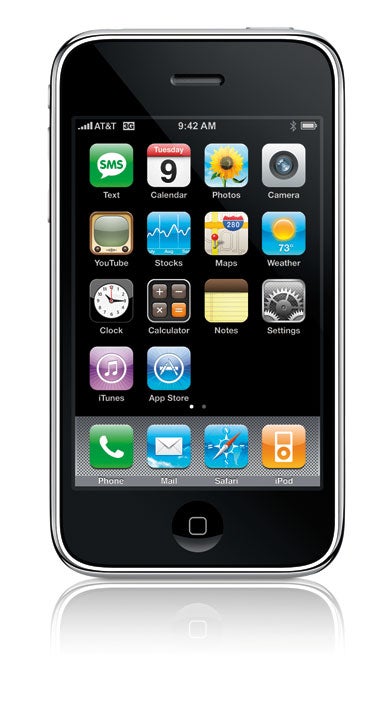
Even in 2011, there is something fun and sexy about the iPhone. Because of design, marketing and advertising, the iPhone has cultural value embedded in its hardware that Droids just can’t match. When people pull an Apple iPhone out in public they belong to an exclusive group that is desirable in society. There are enough people on the Verizon network that covet the social status connected to the iPhone to make it a winner.

iPhones Have The Best Apps

With the exception of Angry Birds, where are the killer apps on Android phones? Apple invented and perfected the mobile app experience (and recently brought apps to desktop computing, as well). The Android App Marketplace, by comparison, is lacking. People still want fun, useful apps on their smart phones and Apple has the industry’s best App Store stocked with the best mobile Apps.

iPhones are Usable

For a number of vocal proponents in the tech space, Android offers a superior smart phone experience.

But for the majority of people, the iPhone is the perfect entry into the smart phone universe. The device is stable, secure and easy to understand. That translates into benefits for average users on the Verizon network. Your Aunt Sally may not quite grok how “Droid Does” but she will understand the iPhone immediately.

The iPhone is not for everyone. But it does its job well and most people find something attractive in the device. I’ve already pre-ordered mine (OK, not yet, but I’ve decided to order one as soon as I can). It’s definitely not too late for the Verizon iPhone.

Why the Mac App Store is Game-Changing

Thursday, January 6th, 2011

Apple today launched their “Mac App Store”, something I must admit I didn’t fully “get’ at first.  Originally I assumed it was simply a dashboard-like interface for easily porting iOS apps to OS X.  It’s not, it’s far from it.  It’s actually solving one of the biggest problems plaguing “typical” computer users – downloaded and installing software.

This conversation should sound familiar to anyone under the age of 40 who has parents who use computers.

Me: did you try out [[[SOFTWARE]]] yet?

Parent: I couldn’t get it to work.

Me: huh, why not?  it’s pretty simple to use.

Parent: I don’t know, it’s just not on the computer, I don’t know why.

Me: did you install it?

Parent: Yes!

Me: okay, so what’s the problem?

Parent: Not sure, after I went to their website I never could get it to open.

Me: what happens?

Parent: It always tells me its installing.

Me: so you ran the installer?

Parent: yes.

Me: so what’s the problem??

Parent: I have no idea, fix it next time you come over.  How are the kids?

The reality of the world is tons of folks are downloading, but the successful installation and execution of software on computers is an utter mess.  And yes, even on OS X it’s a mess – why would I want to drag into the Applications folder?  Why isn’t that automatically done?  How do things get in the dock?  Etc.  The App store fixes all of this, and fixes it well.

With the latest OS X upgrade, the App Store appears in the dock automatically.  Upon launching the user is required to sign in to their Apple account (probably the worst part of the experience, as it should just pull in iTunes account info), then they can download/install/run new software as effortlessly as they can on an iPhone/iPad.  The new app automatically installs and adds itself to the dock – that’s it.

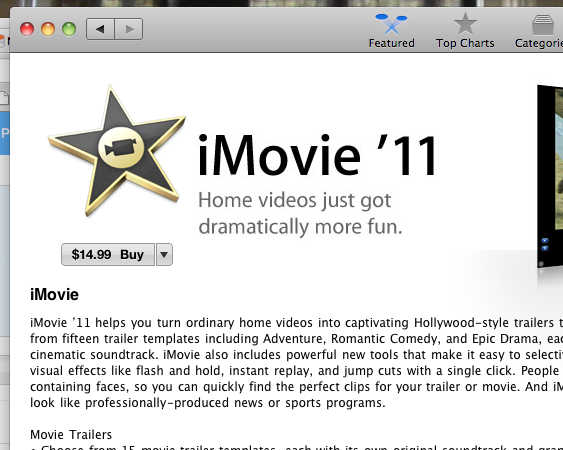
One other “oh, sweet” moments I had while perusing the App Store?  No, it wasn’t Angry Birds (seriously, yawn much? it’s an okay game, but it’s time to move on.  it’s like after they started airing “Who Wants to be a Millionaire?” seven nights a week!).  It was finding iMovie ’11 available for individual purchase.  This is another important move, as Apple is unlocking the previously bundled iLife (and iWork) suites.  Perfect for folks like me who like the features of one ’11 app but not the other (in my case – I don’t want iPhoto ’11 yet).  This creates a lot of opportunity not just for Apple, but for other software vendors seeking to “break up” packages and make incremental additional revenue from the extras.

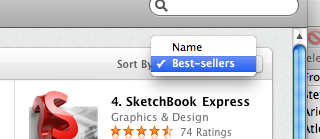
It’s not perfect, by any means.  There’s still no solid UNinstall, which is a big missing part (try AppZapper – thanks @MG!). For example, I can’t sort by Ratings, there’s no ability to preview apps, etc. The store is so simple that at times it truly feels simplistic. Some categories seem odd (does weather need a whole category?) and others completely under-developed (games? one category for ALL games?).  I’d also like to see screenshots get replaced with screenflows/video demos.  But that’s about the entirety to my complaints at this time, and that ain’t bad all things considered.

Since the original dot-com explosion, the tech industry in general has avoided new consumer-facing software like the plague.  Half (or quarter) baked Web ideas or apps get funding out the wazoo, but tell an investor that there’s downloaded software involved (worse yet – a plug-in), and they run for the hills (well, not really, since they’re probably on Sand Hill already, but that’s just a weird wording thing).  It’s funny that we’ve needed the success of the mobile app market to revitalize the “old fashioned” software market, but that’s exactly what the Mac App store is going to do.

If there’s one thing we can truly say the App store “killed” today, it’s the traditional installer.  And rest in peace, but you won’t be missed.

CES Tips For 2011

Monday, January 3rd, 2011

This is my fifth consecutive year of posting Tips for Surviving CES (note – nobody typically dies at the show, so the whole “survival” thing is a bit tongue-in-cheek, though the CES Flu is a pretty much guaranteed thing), you can find prior editions for 2007 (and part 2), 2008, 2009, and 2010.  If I go to the show (game-time decision due to recently expanded family) it’ll be my 11th consecutive time attending (there’s a picture of me winning best of CES in 2004 – gosh I look young!).  Much like the past few years, little has changed, so here’s the minorly edited version…

  1. Wear Comfy Shoes!
    Of all the feedback I get on these lists, this is the one people appreciate the most.  CES isn’t supersized like it was back in ’08, but it’s still big, and tired feet equals sore back equals unhappy attendee.  Freebie bonus tip: while walking the show floor, try to walk on the booths as they tend to have better padding than the walkways between booths.
  2. Stay Clean
    I’m not a purel fan in general, but for a show like CES with over a hundred thousand people visiting from every continent, you are guaranteed to bump into someone who has exposure to some bizarre strain of something that’s going to make your next few days pretty miserable.  Keep your hands clean, wash before every meal and snack, and you’ll at least up your odds of avoiding the CES Flu next week.  Good luck.
  3. Pack Light
    My recommendation is to walk the floor with either nothing or a near-empty backpack. Forget shoulder straps, you’ll be aching by the end of the day. Bring nothing you do not need during the day. Also, try to dump your bag prior to dinner, so you can spend the night on the town without having to remember anything later. What happens in Vegas…
  4. Be Nice to the Staff
    Booth workers have likely sacrificed their entire holiday season to prep for CES.  They have to answer a thousand questions or so an hour.  Their demos are probably going to go awry as they are probably dealing with brand new gadgetry that doesn’t really work so great.  Treat them nice – don’t pester them as if they are tech support – they aren’t.  Don’t ask them hour-long questions on some weird technology nuance.  Don’t badger.  And don’t suck up all their time considering there are folks standing right behind you with questions to ask too.  Just be nice, they could use a little break from time to time.
  5. Plan Everything
    Figure out which booths in which halls you are going to prior to getting there.  Figure out where your dinner is, and book enough time to get a taxi.  Figure out where to get your badge before going there.  Figure out where your parties are, and plan that properly.  ”Winging it” utterly sucks when it comes to CES and Las Vegas.   Traveling between any two destinations could easily take an hour, even as early as 8am. If you try to leave the show, go to a hotel, then come back, your day is done.
  6. Skip the Swag
    Do you really want a Panasonic pen, or a Sony plastic bag, or a brochure from TiVo? Really? My wife has actually forbidden me from bringing home anything, period. Also, for those of you into conservation (which should be, you know, everyone), no better way to send a message than to leave Samsung with an extra truckfull of mints (note that for the 2011 edition I changed LG to Samsung, just for funsies).
  7. Stay Hydrated
    If you carry only one thing (a simple backpack, remember?  no?  back to #3 for you!), it should be a bottle of water.  Also, since your hotel room will be quite dry, leave the bathtub 1/4 full of water overnight, you’ll feel better in the morning.
  8. Get Connected
    Since about 80% of everyone at CES will be using an iPhone, odds are y’all won’t have much of a signal.  Further, wifi is going to be spotty at best.  I recommend relying on texting as your go-to method of staying in touch with folks.  Either that or grab a MiFi for the week.
  9. Share Cabs!
    When you get to your hotel taxi line in the morning, and it’s huge, here’s a simple trick to save yourself 30 minutes per day(or more).  Walk to the front, ask if anyone’s going to the convention center, if they say yes, offer to pay for their cab.  You aren’t actually “cutting” in line, because the person who was 2nd in line remains 2nd in line and you have no impact on their wait.  Easy one, eh?  By the way, you should be sure to tip a little extra when you do this, since you’ve taken away a full fare.  Plus, sharing is caring (I don’t know how that fits in here, but it sounds so nice to say).  Oh, and don’t forget – you can’t hail a taxi in Las Vegas, so grab them at hotels, restaurants, or the LVCC.
  10. Layer Up
    Vegas is in the middle of a big desert, and while it may be warm during the day, the nights are very cold in January.  Bring a jacket or a sweater when you go out.  But don’t forget to leave your CES badge in your hotel room before you leave for the night!
  11. Bring Business Cards
    I would say roughly 97% of the people that I’ve met at CES over the years who don’t have cards regret not having them. Maybe it seems cool now not to carry them. Maybe you think they are so 1990s. The truth is, there’s almost no reason not to carry cards, and even looking at it from a potential loss vs potential gain perspective says: carry the darn things! And Moo cards don’t count, people.  Updated for 200920102011:  Still true.
  12. Follow Live Online
    Engadget puts up a post every 3.8 seconds during CES (this is not a fact, I am just guessing – it’s probably more frequent than that). Make sure you tap into theirs (or Gizmodos or your own favorite gadget blog) during the course of the show.  If you are AT the show, you might find out about something cool to see; if you are stuck in your office, it’ll be kinda like being there, except you are stuck in your office and they’re in Vegas. Loser.

And there you have it, the elusive Top-12 list in action.  Hope it helps, hope you have fun, hope I can be there myself (can’t break the Ironman streak!!!).

Why 2011 Won’t be the Year of Cord Cutting

Saturday, January 1st, 2011

I love the vision of cord cutting.  I hate it’s reality.  In reality, other than for the technically savvy and people under the age of 25, cord cutting just makes TV-based entertainment really really hard.  For the rest of us, it’s simply easier to deal with the cable/sat companies we tend to dislike, remain grumpy, and watch anyway.  I originally posted the following as a long comment on this piece at NewTeeVee, then decided it was “blog-able”.  Read the original post first prior to my rebuttal, otherwise this makes little-to-no-sense…

Janko,

I enjoyed reading your post, but one opening question – Your predictions are “an option embraced by a large number of consumers” and “we’ll end the year with a substantial loss of subscribers”. I ask – what does this mean?  Is a million households “substantial”?  Is ten thousand a “large number”?  This distinction matters quite a bit.
While I appreciate the vision of cord cutting, the simple reality check is this – the only market segment truly ready to “cord cut” is new college grads who don’t currently have cords.  By and large there are no viable ways to get rid of a real cable/sat service that mainstream consumers can adopt.   I maintain that the only thing truly dissatisfying about “cord” services today is the visibly notable compression in HD signals (it’s ridiculous).  And now for a specific rebuttal to your points:
The economy: when the market actually crashed and unemployment spiked, cord cutting didn’t happen.  Why would it happen 2 years later with a more stable economy and more ppl back to work?
Netflix: I love me some Netflix, but it’s far from sufficient to cut anything.  Let’s face it, the selection for streaming is still so-so (at best) and nowhere near close enough to replace TV.
Retrans/fees: Consumers, for the most part, have no idea, and this is an industry issue, not likely to cause behavior changes.
New devices: For complete disclosure, I am biased ON the side of those who make these devices (in fact, I’m probably tied to more cord-cutting related ventures than anyone other than the guys making the chips and codecs!).  And I am 100% certain that there’s not a single one on the market today that’s compelling enough for mainstream cord cutting (not debating which is better, etc, merely stating the obvious regarding the needs of early adopters and niche techies vs the mainstream).  To be clear, I’m not voicing any opinion on the quality of the products (though I have many), they just aren’t focused on mainstream users yet.
TV everywhere failure: Inertia is actually on the side of the cable industry.  They’ll continue to improve the service to “Acceptable” levels, and that’ll stifle any other innovation from having a real chance.
Bottom line is cord cutting is one of those things that sounds great right now, just like moving to Canada when Bush got re-elected in 2004.  But in pragmatic terms, it’s just a major pain in the ass (though I am actually working on solving that problem as well, but that’s for later).  I’ll put my chips on the “2015 or later” box.

ps – happy new year, my resolution, again, is to blog more.  again.