Archive for May, 2009

My First Truly Crappy Apple Experience

Sunday, May 31st, 2009

I’m coming up on 2 years into my MacBook/OSX life, and while I’m not quite a drooling fanboy, I am most certainly drinking some of the Apple flavored Kool-Aid.  Why? Because everything just works, almost all of the time.  Seriously.  I do have the occasional frozen application, and have been forced to reboot against my will periodically, but it’s a rarety.  And I still miss Windows keyboard shortcuts, iMovie is horrendously bad next to Windows Movie Maker, and Mail/Calendar could use some help too.  But for the most part, I heart my MacBook and recommend them to everyone who asks.

Yesterday, however, I had one of those “What The What?” moments with an Apple application.  One of those “I’ll bet Steve never saw this user flow” before thoughts.  Here’s the rough sequence of events…

  1. Inside iTunes, I went to the Store.  Easy.
  2. Looked for TV Shows.  Easy.
  3. Found Kids category. Easy.
  4. Found Thomas the Train.  Easy.
  5. Bought an episode.  Easy.
    While my wife and I *rarely* entertain our son with TV programming, we had a long day in front of us and wanted to have a lot of backup ready, just in case.  Thomas the Train, muted, was our selection, mainly because we didn’t have the ability to buy old Montreal Canadiens hockey games.  Which, of course, are perfect for children of all ages (as long as you remain in the years prior to 1994).
  6. Paid for the episode. Easy.
  7. Watched the episode download to my hard drive. Easy.
  8. Closed the lid. Really easy.

    several hours later (yup, after about 7 hours the moment struck – we were exhausted, kids missed nap time and we were just out of steam to keep anything interesting)…

  9. Opened the lid. Easiest step so far.
  10. In iTunes, clicked Library, then TV Shows. Easy.
  11. Found Thomas the Train, double-clicked on the episode. Uh oh.

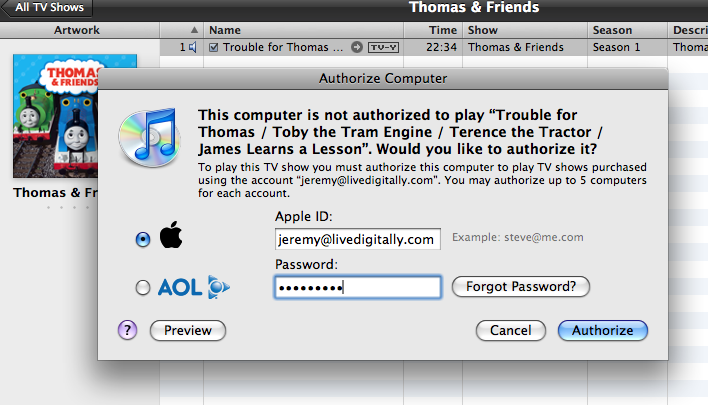
Here’s the first dialog I saw:
thomas-the-train-authorize

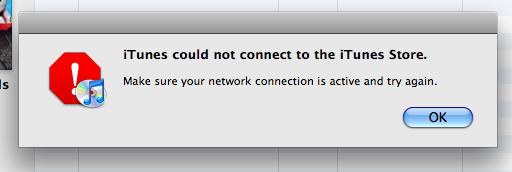
I was being asked to authorize this computer.  Now, as an interesting point, I’d never, ever, purchased anything from the iTunes store before. Here’s the problem – I was offline by now.  And I was pretty sure what would happen next, but I clicked through anyway.  As a result, here’s the next screen I saw:
thomas-the-train-not-connected

And huge whopping frustrating FAIL.

So my note to team iTunes: when a user makes their first purchase from your store, you should probably get the authorization thingamajigger to happen at the same time.  If not, warn them, in a big honking font, media will not play until you authorize your computer (and you will need an Internet connection for this). Don’t worry, I’m still BFFs with OS X and everything, but this is an easy thing to fix. And even if it only happens to a tiny fraction of a percent of your customers, it’s too easy not to do it better.

HDMI introduces 1.4 version, prepping millions for confusion

Friday, May 29th, 2009

Want a quick way to confuse a customer?  Throw a new version of something on the market.

In the software world this is accepted, and typically expected, though nobody really likes it.  New versions cause support and communication breakdowns between customers and vendors, and create extra work for software teams to test and maintain.  But again, with software, it’s just the way things go.  You can choose not to upgrade something and keep using the old version, or be on the cutting edge and try the pre-release “beta” version of something.  Again, software is easy when it comes to versioning.

Hardware, on the other hand, is a little trickier.  When my MacBook has a firmware upgrade, not only is a reboot in order, it takes complete control of my system for a while.  The same is true for my cell phone, my Slingbox, and other gadgetry I own.  Upgrading a device usually requires a dedicated application/program to do the work for you.

But how do you upgrade a cable?  Well, it turns out you don’t.  You buy a new cable. And you clearly tell consumers the difference.  Unless you are HDMI, in which case you upgrade the standard from 1.3 to 1.4 and require a new cable, despite not renaming it. This, my friends, sucks.  Here’s a little vision of the future for you:

Random customer in Best Buy: “Hi, can you help me find an HDMI cable for my plasma?”

Best Buy employee: “Sure, do you need a 1.3 or 1.4 cable?”

RC: “What is that, metric?  How about 6 feet?”

BB: “Hah, no, I meant what version HDMI cable?”

RC: “One that works with my plasma.”

BB: “Here, I’ll show you the two cables, see how the ends are different?  Which one looks like the one on your plasma.”

RC: “Gee, I don’t know, why on earth would I remember that?  I sure remember when they were red/yellow/white, or red/blue/green, or S-video.  Now I have a plasma, and my son said I should get HDMI.”

BB: “Yes, well you need to know if it’s the 1.3 standard or 1.4 standard.”

RC: “What’s the difference?”

BB: “1.4 is faster!  It can send Internet content too!”

RC: “I’m going home now.”

and… scene.

To be clear – I think the new technology is cool.  But why couldn’t they just call it something completely different?  A “point upgrade” for a cable?  Really?  Bad idea.  According to a graph I saw on VentureBeat there are over a billion HDMI cables already on the market.

As a technologist, I “get” the upgrade as a concept.  But as a consumer I dread the support calls I’ll inevitably get from friends and family members with incompatible devices, equipment, and cables. I certainly don’t want to have a call like (I’ll let you find the source to the following, as it’s one of my favs)…

Okay. Did you use the Intensifier Disc?
Yes.
Turn the controls 18 degrees to the left?
Did that.
Are you in Europe? Do you need an adapter?

I hope when HDMI 1.4 comes to market it has a completely new name, like HDMI-PRO, or S-HDMI, or something other than a number. Ditto to the USB 3.0 people, by the way.  There’s a certain point where the numbers have to go bye-bye, and mass-understandable concepts must take over.  This is one of them.

Essential Comparison Chart for Canon Point-and-Shoot Cameras

Friday, May 22nd, 2009

I’m a long-time fan of Canon’s point-and-shoot digital cameras.  I’m not a long-time fan of their numbering schema.  There are (at present) four “lines”, the 7xx, 8xx, 9xx, and 1xxx.  There is no single commonality across any camera within any line.  The “current” models for each are the 780 (newer than the 790!), 890, 960, 970, and 1200.  As far as I can tell, there is no predictability nor rhyme/reason to any model, nor any way to figure out which unit is better than another, without exhaustive research.

So, if you are like me, and want to look into purchasing a new Canon camera, you will rapidly find yourself frustrated beyond belief.  My friends, here is your cheat sheet.  Please note pricing for outdated models is based on what I could find out there, and I highly recommend *not* buying anything more than 2 years old (marked in gray – the orange columns are the “current” models)!

Here’s a direct link to the sheet for those who want to sort or search through it. I hope this is useful for anyone trying to buy a camera. If you have any other suggestions, please add your thoughts in the comments!

Where’s the Kindle Used eBook Store?

Monday, May 18th, 2009

I’ll summarize my long-winded (but well-adorned) post on the Kindle by saying: solid device, don’t like the spending model around eBooks.  While the ultimate solution for digital music and video is obviously based around subscription businesses, it’s not so clear for books.  Fundamentally the book industry has a long way to go before it truly gets threatened by the digital book industry (though clearly they shouldn’t wait forever).

I buy a lot of used books myself (on Amazon I rarely spend more than $6, shipping included, for any given book I buy). I’ve been pondering quite a bit on how to make a “used” eBook model work, and I think for a closed system like the Kindle, it’s a real possibility.  Unlike MP3s, for example, which can be duplicated perfectly infinite times, a book “file” on the Kindle has a unique code, and all Kindles are “registered” to talk to Amazon’s servers.  In other words, there’s no such thing as a “copy”, just an individual “instance”. As a result, when a single “new copy” of an eBook is sold, it’s instance is known forever.  Therefore, just as in paper books, there are a finite number of copies in existence, although unlike paper books, Amazon knows exactly where they all are.

How it works…
So what if, after reading a book, the reader could choose to “sell it back” to Amazon?  After all, when I get a paper book I can do just that (or give it to a friend), and neither Amazon nor the publisher mind terribly that I do (otherwise the used bookstore industry would be illegal).  And what if by selling it back, the original reader could get a modest credit, say $2, for use exclusively on the Kindle store.  Not much money, but it basically implies that at $9.99 per book, you get 1 free with every 5 you buy.

By selling the book, the original reader’s Kindle deletes the file, and somewhere in the Amazon servers, one new “instance” of a “used copy” of that particular title is available for purchase. Now, some other Kindle owner can browse the title, see the used copy, and buy it.  No matter what there are no extra copies being made.  This is key, because the natural cycles of supply and demand will still force new copies to get sold. In fact, this would mimic a highly efficient economic model that does not presently exist in the Kindle landscape (where buying a popular title, say Angels and Demons, costs $7.99, whereas the used paperback is selling for $0.01).

Money stuff…
I’d price the used copy at $6.99, though obviously it could be higher or lower, but that seemed like a fair price.  Also, the “resale credit” for the used book would have to be less, call it $1 per copy.  For the last part of our system to work, Amazon would pay an additional royalty to the publisher at $3.01 per used copy (that number explained later).  As our first “why this is important” story – publishers would be generating revenue from used books, something they’ve never done before.  In fact, an individual book sale becomes a recurring revenue stream, rather than a one-off sale (nightmare for the accountants, but a plus to everyone else).

Next reason why it matters? It turns out Amazon actually loses money on every new copy sold ($3.01 per book – sound familiar?).  With the used sales, Amazon would turn a profit on a title after 2 resales ($6.99 – $3.01 to the publisher – $2 to the user = $1.98 to Amazon).  After 10 resales, both Amazon and the publisher have profited (yes, it’s all profit) an additional $20 each for the title.

But wait one second young man!
Which leaves us in the inevitable problem area of the model.  It’s that unpredictable area that makes the math a wee bit hard without more data.  The question arises: how will this impact the sales of new eBooks?  Well, no, that’s the wrong question (albeit it’s the one that would/does stop anything like this from happening).  The right question is: how will this impact the overall profitability of selling eBooks?

The important part here is: it makes no difference to the publisher!  If used sales cannibalize new sales in any way, the publisher makes the same amount of money as they did before (assuming the market size doesn’t change).  Further, the more the used sales do cannibalize from new sales, the more profitable the market is for Amazon.   For example, if a given title would sell 100K copies new on Kindle, there’s $301K in revenue to the publisher, and $301K in costs to Amazon.  If 50% of the copies were “used”, then the publisher still makes $301K, but Amazon now only loses $51500 (roughly).  Now that’s some dot-com revenue thinking for you!

amz-used-books-direct

But wait, it gets even more interesting!
Let’s pretend that due to the combination of reduced costs and users earning credits for selling the books back into the system, there’s an overall increase in purchasing.  I can’t prove it, but it sure seems likely if you think about it (or make an excel spreadsheet like I did).  If used sales bump the overall market up by 5%, the same 100K title sends an extra $7500 to the publisher and reduces Amazon’s losses by about $5000 (at the 50% cannibalization rate).  If the market bumps 20%, Amazon halves their loss, and the publisher is up a total of $30K.

amz-used-books-5

While we’re at it, if cannibalization gets to 60%, Amazon is now profiting (instead of, in case I didn’t make it very very clear, losing money every time their customer buys their product).

amz-used-books-20

Not too shabby there, Mr Toeman.
I’m sure I’m missing some details here.  There are agreements I don’t know about.  There are market sizing issues I’m unaware of.  I don’t know how price-sensitive Kindle users really are.  It might be, you know, illegal due to some nonsense in the DMCA (yeah, I’m not a fan, amazing, eh?).  Also, it’s clear that current pricing for eBooks is in flux, and who knows where things will end up.

But it sure makes sense both economically and practically speaking.  In fact it’s one of those barriers that I believe prevents wider adoption of the Kindle.  Not the lack of a used eBook section, but the inability to do something with a book once you are done with it.  I’d love to be able to “gift” an eBook to a friend once I’m done with it.  Plus I think it’s a model that just “feels right” to those of us who wouldn’t throw out money on new copies of hardcover books.  Or cars, while I’m at it, as there is no single worse use of your money than buying a new car.  Well, you could set it on fire, I suppose, but that’s just plain silly.

Non-tech interjection post: Going Crazy About Societal Hypocrisy

Friday, May 15th, 2009

Over on my personal blog I’ve put together a little “compare and contrast” pictography of the ridiculous hypocrisy overflowing in modern society. Ooooh, pictures!

Mobile Email Still Sucks, Here’s Why

Thursday, May 7th, 2009

I’ve written in the past regarding why I gave up on mobile email, and have recently entered quite a few entertaining discussions on the topic. In a nutshell, I feel the “mobile email lifestyle” is generally a bad one, typically causing much higher stress levels in people.

Now before everyone reading this on a BlackBerry jumps down my throat, there certainly are some times when mobile email is useful, helpful, and productive. Here’s the list:

  • Sitting at your gate/otherwise waiting for a flight (but not, of course, once they’ve told you to turn off your phone, because as of that point you are just being a jerk by leaving it on.  yup, that’s right, a big jerk)
  • Waiting for some big deal to close (sorta – you really could do this with the phone, but I’m sure there are times when it would be necessary to have the email interaction)
  • Sitting at dinner with really close friends/family

I’m sure there’s a few more exceptions that I’m not thinking of, and I’m okay with that.  For the most part, I see people with BlackBerries and iPhones checking email all.  the.  time. Sure it’s annoying to those of us trying to spend any time with these people, but bad manners are probably just the most superficial of issues.

Constantly “on call”
When you sport a mobile email device, and reply to emails at all hours of the day, night, weekend, etc, you effectively say to your coworkers “I’m always available.”  And by being always available, it becomes harder and harder for you to decide not to be available.  Which leads to bosses/clients/peers sending in emails, expecting near-instant turnaround.  Which effectively means you can get in trouble just by not checking email during dinner.  Personally, I don’t like the idea that “important work stuff” happens at all hours – it doesn’t. And if you aren’t a doctor, firefighter, cop, or other person whose work truly happens at all hours, trust me, you can skip email tonight.

Less responsive to non-essential emails
BlackBerry people love to talk about how easily they can check email, anytime, anywhere.  But they tend to do a much worse job at following through with non-essential emails.  And, since those emails got marked as read right away, they tend to fall to the bottom of the priority list when the user actually gets to a computer.  This is all compounded by the aforementioned issue that we know you read the emails we sent!  Let’s be totally clear here: if you have a BlackBerry or iPhone, we know you get *all* email, and we know you check it right away.  Lost emails are BS, it’s readily apparent that you are actively choosing not to respond to us.

Introduce work time during personal time
It’s not just that you are checking emails while we’re eating dinner, the distraction factor is just a part of it.  It’s that those emails have impact on you and your mood.  And let’s face it, if you are checking emails all evening long, odds are pretty good something will tumble into the inbox that will cause you more stress.  So much for our happy evening, as you are now preoccupied with your work problem.  There’s obviously the counterpoint here about getting some great news, like closing a deal, etc, but those are few and far between (and are much more fun on the phone anyway).  Nothing like finishing up a meal with Mr Grumpypants who just found out some deal isn’t going to close.

Did I mention the bad manners?
I get that we live in the rapid-fire, constant interruptive, crazy overly connected world.  But there is no debate that pulling out a gadget and reading an email while you are engaged in conversation is rude.  Always.  Even if there’s a lull in the chat, it’s not an excuse.  Hang on a sec.

Sorry, I was checking email on my phone while you were waiting for me to finish typing.  Get the point?